
Enterprise Deployment
One Helm chart. Every service an enterprise needs for AI - from identity to observability. Deploy the complete Zenera Platform on any Kubernetes cluster in minutes.
What Ships Inside the Chart
Zenera ships as a single Helm chart that deploys a fully integrated AI platform onto any Kubernetes cluster. There is nothing to stitch together, no third-party SaaS dependencies to negotiate, no gaps to fill.
Identity, storage, search, orchestration, observability, LLM routing, development environments, and production-grade application services - all packaged, configured, and connected inside one helm install.
This is not a framework you build on top of. It is a finished product that enterprises deploy, configure, and run.
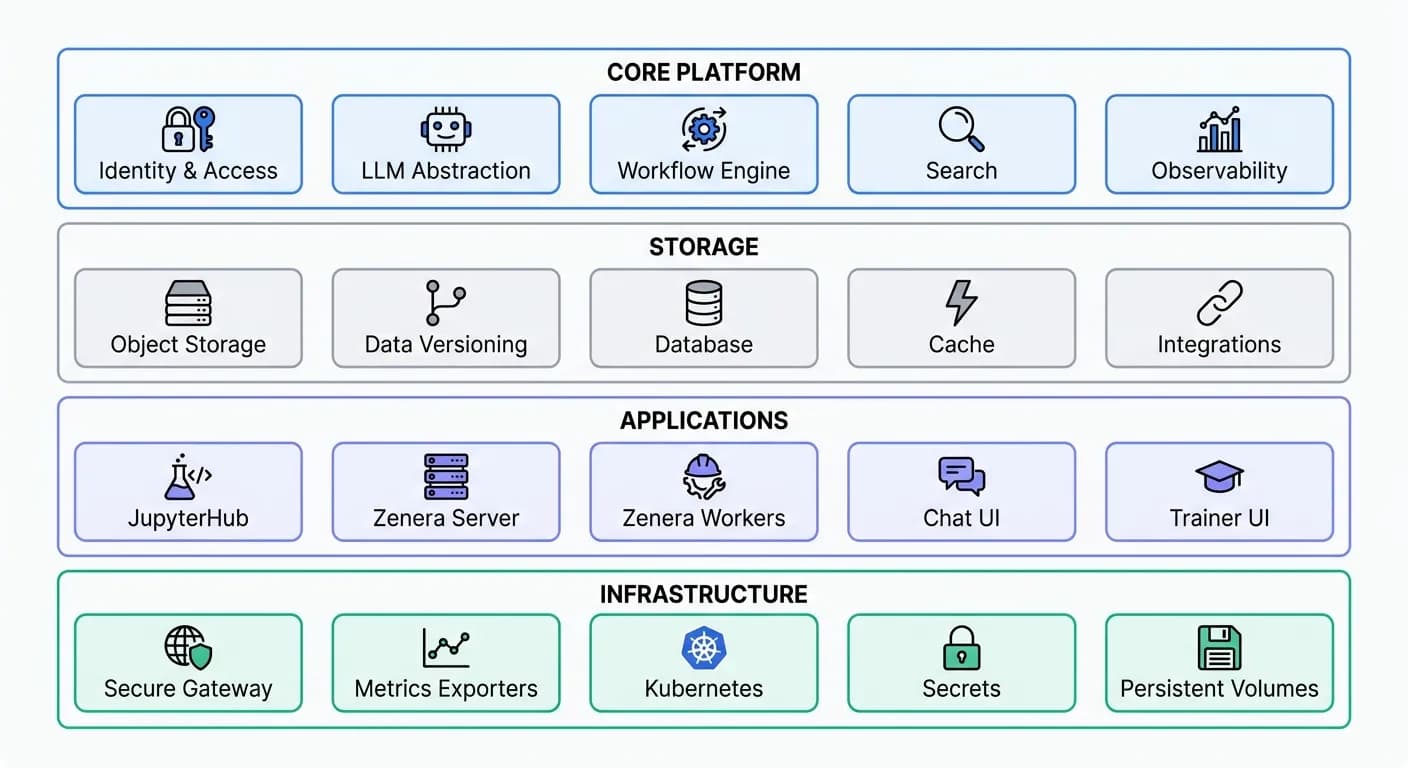
Every rectangle above is a Kubernetes Deployment, Service, or Job managed by the same chart. Every connection between them - networking, environment variables, shared secrets, health-check ordering - is pre-wired.
For how these services support self-healing agents, durable workflows, and full agentic systems, see the Zenera architecture guide.
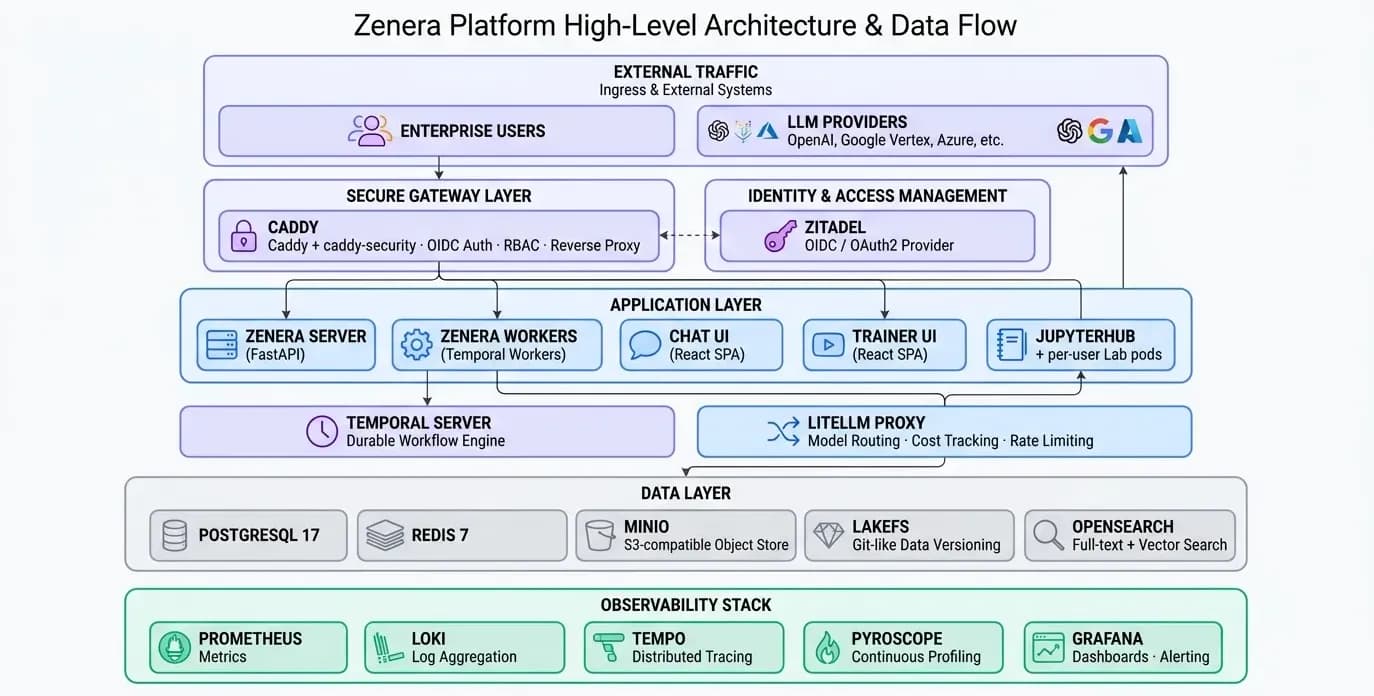
High-Level Architecture
Identity & Access Management
Every request that reaches any service inside the platform passes through a centralized authentication and authorization layer. There are no anonymous endpoints. There are no services that manage their own credentials.
How Authentication Works
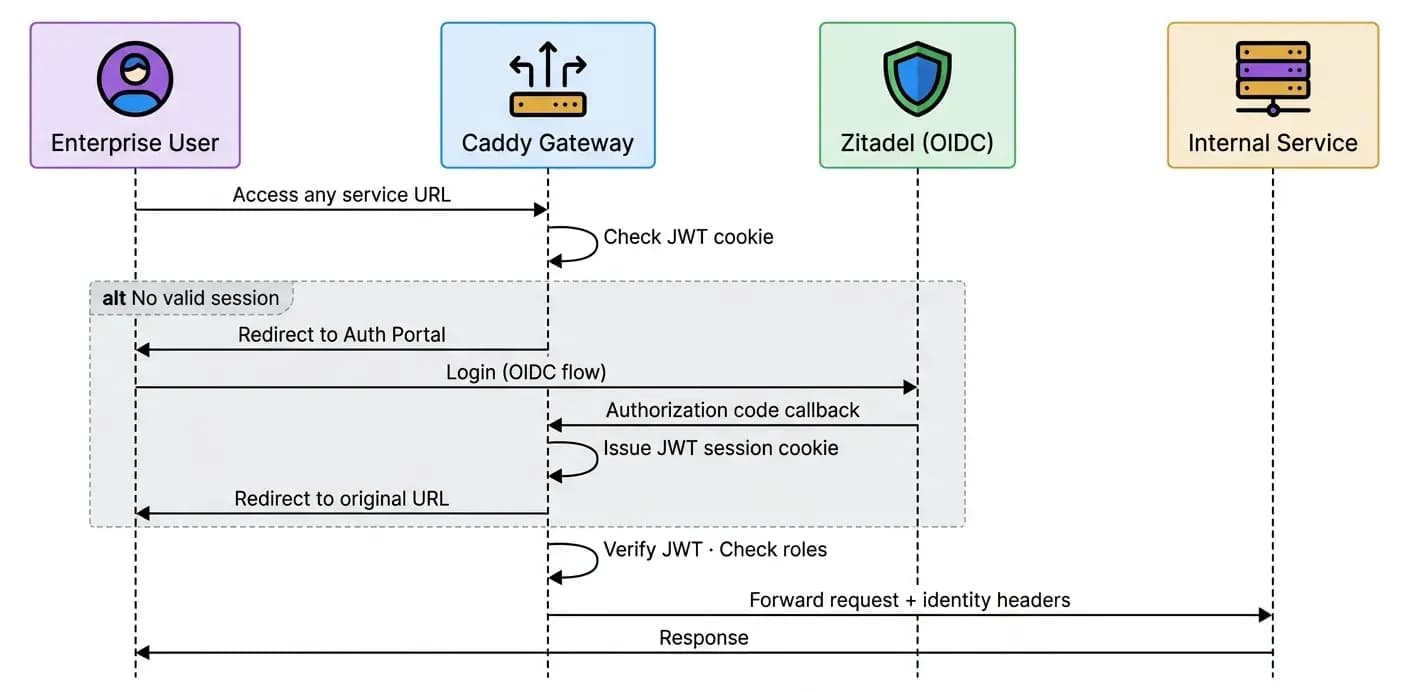
Zitadel is a full OIDC / OAuth 2.0 identity provider deployed inside the cluster. It handles:
- User management - Create organizations, invite users, enforce password policies
- Multi-factor authentication - TOTP, U2F/FIDO2, passwordless
- SSO federation - Connect enterprise IdPs (Okta, Azure AD, Google Workspace) via SAML or OIDC
- Service accounts - Machine-to-machine tokens for CI/CD pipelines and external integrations
- Audit logging - Every authentication event is recorded
Gateway-Level Authorization
The Caddy gateway with the caddy-security plugin acts as the enforcement point. Every internal service is exposed through a dedicated port on the gateway. Each port maps to an authorization policy that specifies which roles may access it:
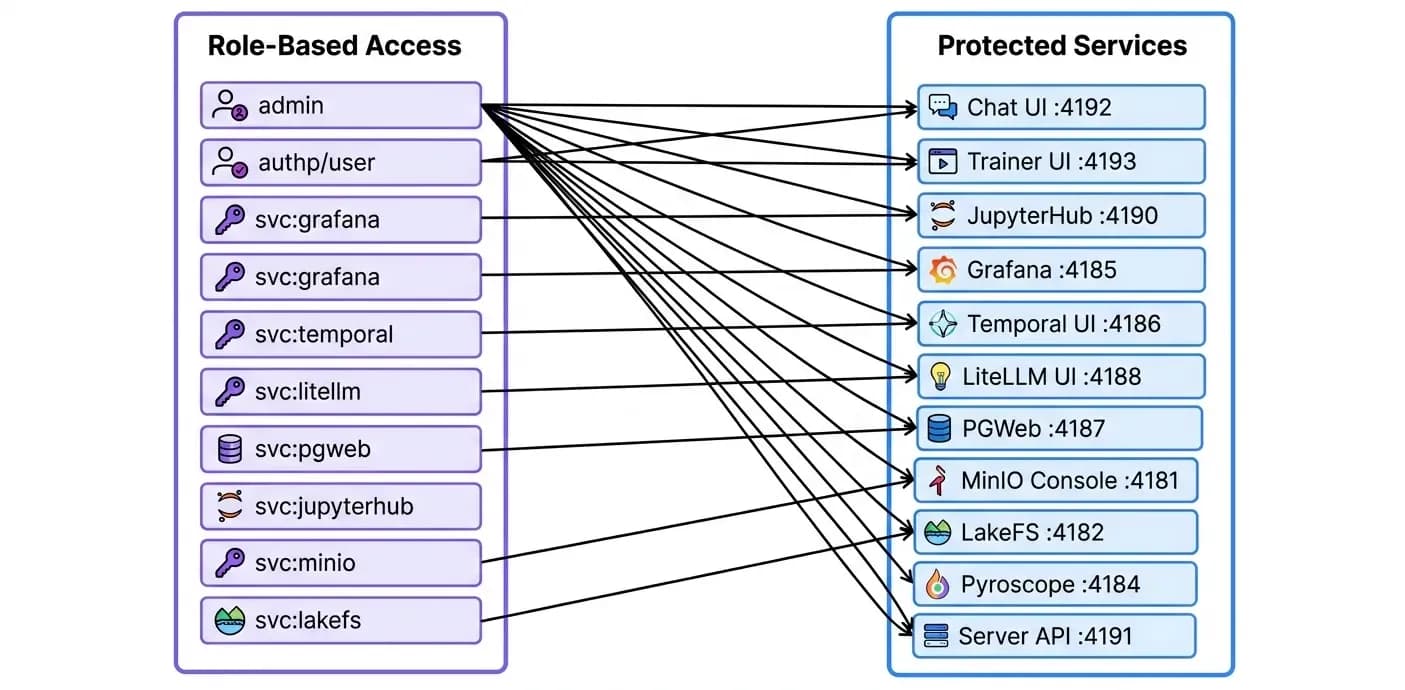
Operators assign roles through Zitadel's admin console. A data scientist might receive authp/user and svc:jupyterhub. A platform engineer might receive admin. Business users might receive only authp/user to access the Chat UI. No code changes required - role grants are instant.
Seamless SSO Across All Services
Once a user authenticates through the gateway portal, their JWT session cookie is valid across every service exposed by the platform. JupyterHub reads identity headers injected by Caddy - no second login. Grafana receives the same identity. LakeFS, MinIO Console, Temporal UI - all behind authentication, all seamless.
LLM Abstraction Layer
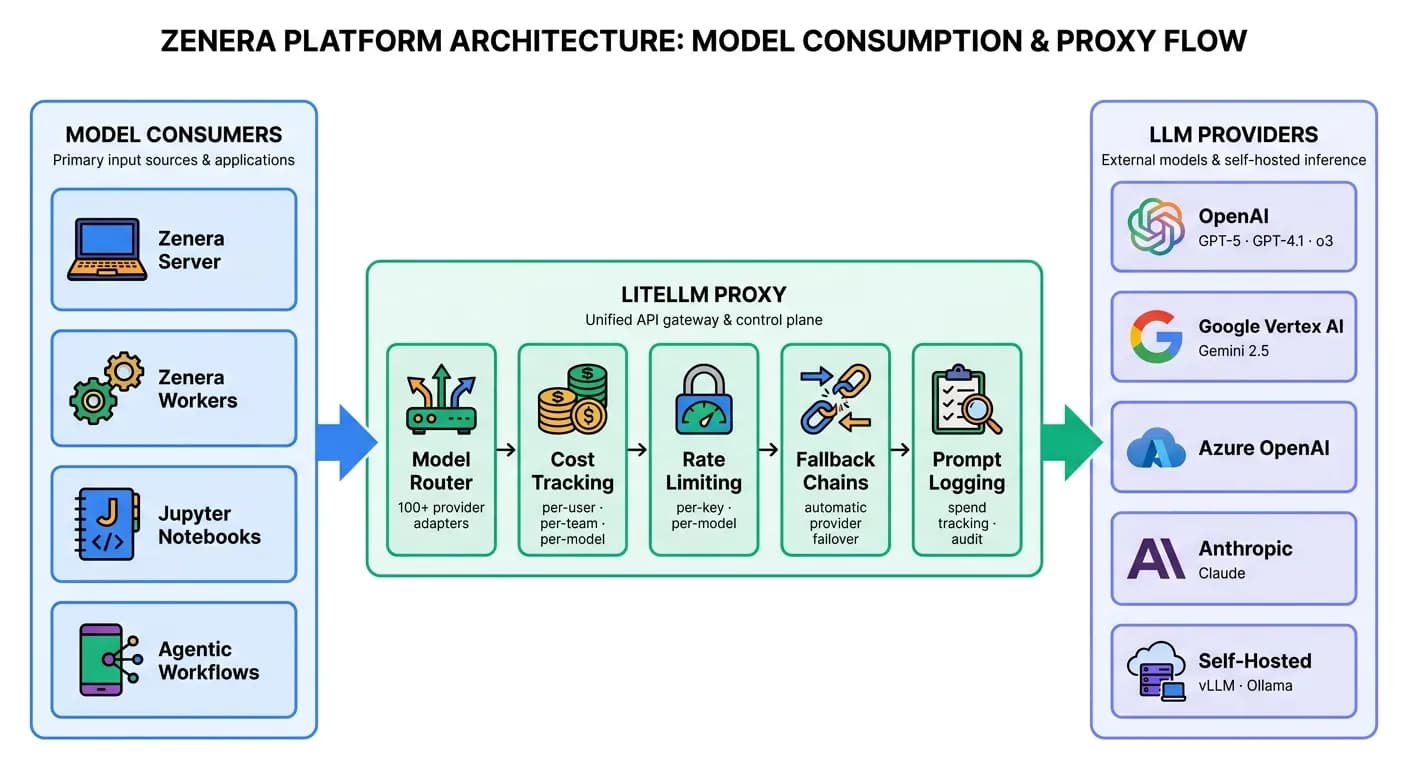
The platform does not hardcode any LLM provider. Every model call - from every agent, every notebook, every service - routes through LiteLLM, a unified proxy deployed inside the cluster.
Why This Matters for Enterprises
- Provider independence - Switch from OpenAI to Anthropic to Google to a self-hosted model by changing one configuration line. No application code changes.
- Cost visibility - Every token is tracked by model, by user, by project. Understand your AI spend before the invoice arrives.
- Rate limiting and quotas - Prevent any single team or project from consuming the entire model budget.
- Fallback chains - If a provider has an outage, requests automatically route to the next configured provider.
- Data sovereignty - Route sensitive workloads to self-hosted models while keeping general tasks on cloud APIs. Same interface for both.
- Unified API - Every consumer talks OpenAI-compatible API. Internally, LiteLLM translates to whichever provider's native protocol is needed.
Durable Workflow Engine
Agent execution is not a simple request-response cycle. Agents run for minutes, hours, or days. They wait for external events. They retry on failure. They branch into parallel sub-tasks.
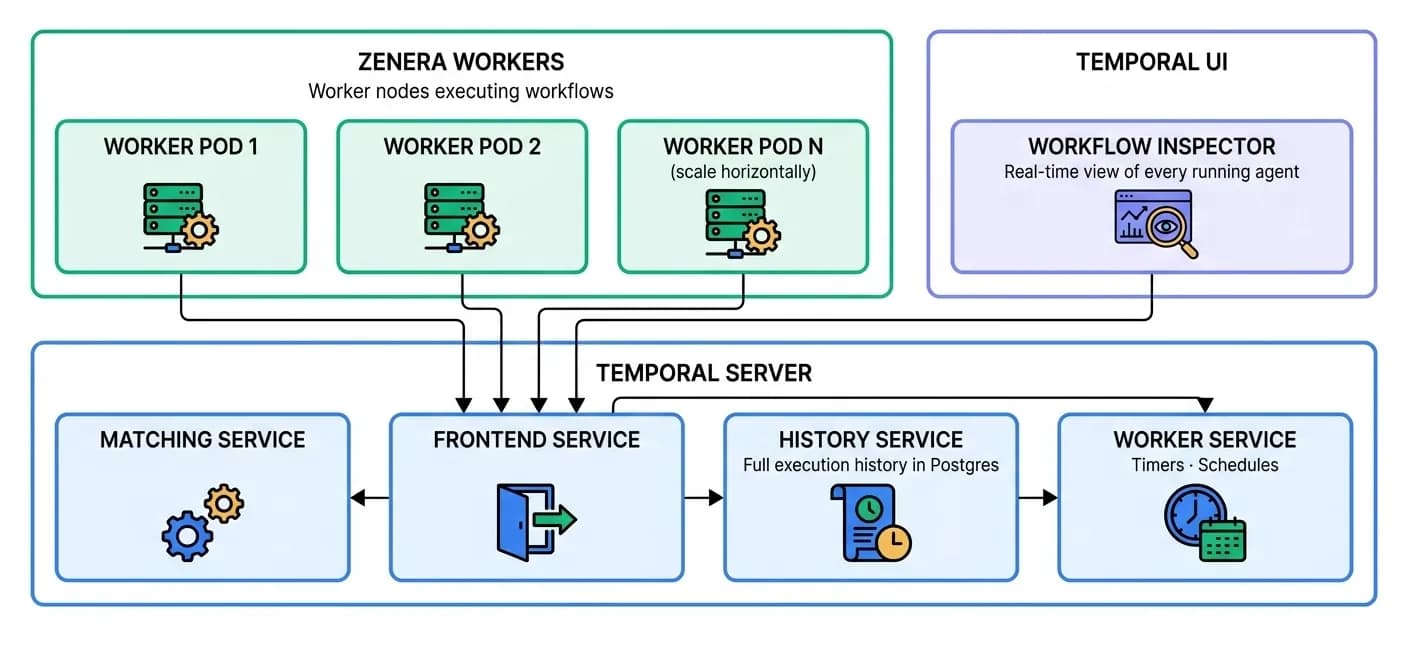
Zenera runs all of this on Temporal, a durable workflow engine deployed inside the same chart.
What Temporal Provides
- Durable execution - If a worker pod crashes mid-task, Temporal replays the workflow from history on another worker. No data loss. No manual restart.
- Visibility - Every workflow step, every activity execution, every retry is recorded and inspectable through the Temporal UI.
- Scaling - Add worker replicas to handle more concurrent workflows. Temporal distributes tasks automatically.
- Long-running agents - Workflows that run for days or weeks do not hold open connections. They checkpoint state and resume on demand.
- Scheduling - Cron-like schedules for recurring agent tasks (daily reports, periodic data ingestion, compliance scans).
Data Layer
PostgreSQL - The transactional backbone
All application state lives in PostgreSQL 17: project definitions, agent configurations, user data, workflow metadata, LLM spend logs, and audit trails. The chart deploys PostgreSQL with:
- Automatic schema initialization via migration jobs
- Connection pooling configured for 300+ concurrent connections
pg_stat_statementsenabled for query performance analysis- Separate databases for application data (
zenera_backend), Temporal (zenera_temporal), Zitadel, and LiteLLM
Redis - Real-time cache and messaging
Redis 7 provides sub-millisecond caching for hot data paths: session state, model response caches, real-time event streams between services, and rate-limiting counters.
MinIO - S3-compatible object storage
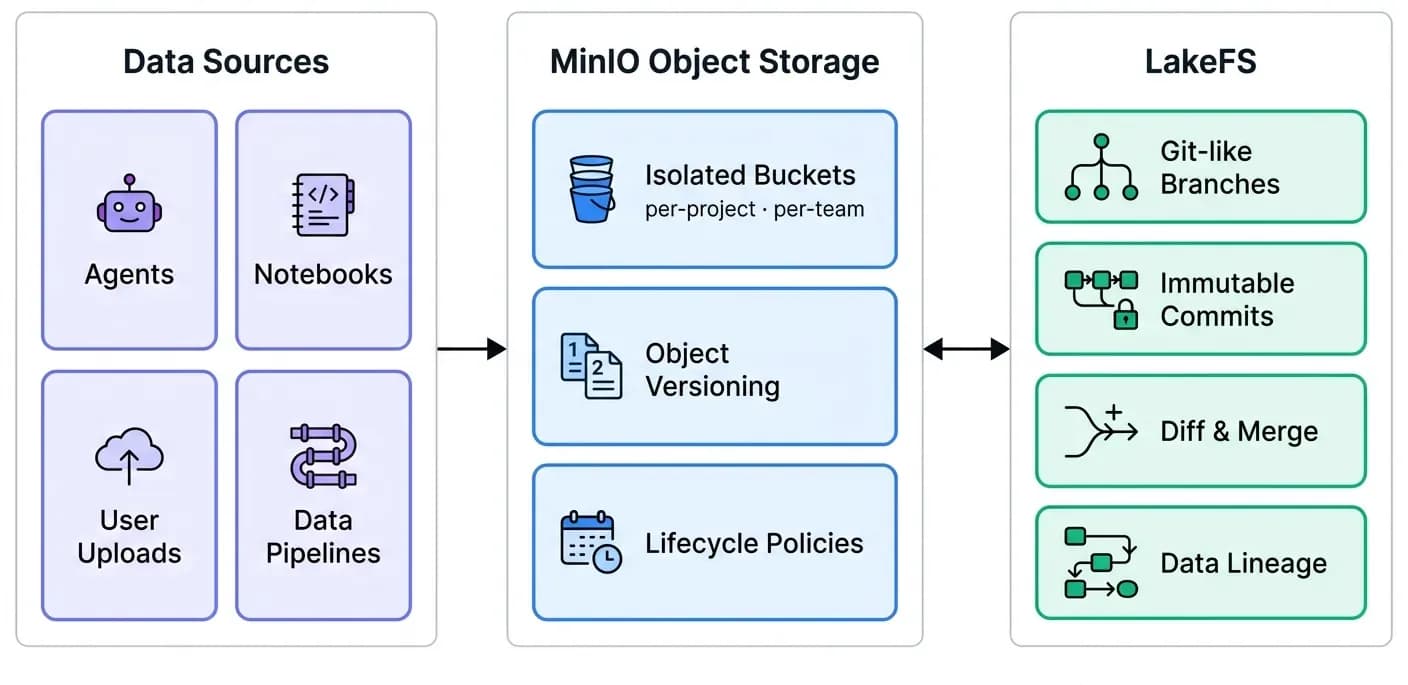
MinIO provides S3-compatible object storage deployed directly inside the cluster. Agent artifacts, training datasets, generated reports, notebook backups, uploaded documents - all stored locally, all encrypted, all under your control.
LakeFS - Git for your data
LakeFS adds version control on top of MinIO. Every dataset change is a commit. Every experiment runs on a branch. If an agent produces incorrect results, roll back the data to the last known good state. This is not file-level versioning - it operates at the scale of entire data lakes with zero data duplication.
OpenSearch - Full-text and vector search
OpenSearch powers the platform’s search capabilities: full-text search across documents, semantic vector search for RAG (Retrieval-Augmented Generation) pipelines, and structured query capabilities for analytics. Agents use OpenSearch to find relevant context, and the platform uses it to index project artifacts for discovery.
Observability - Complete Visibility From Day One
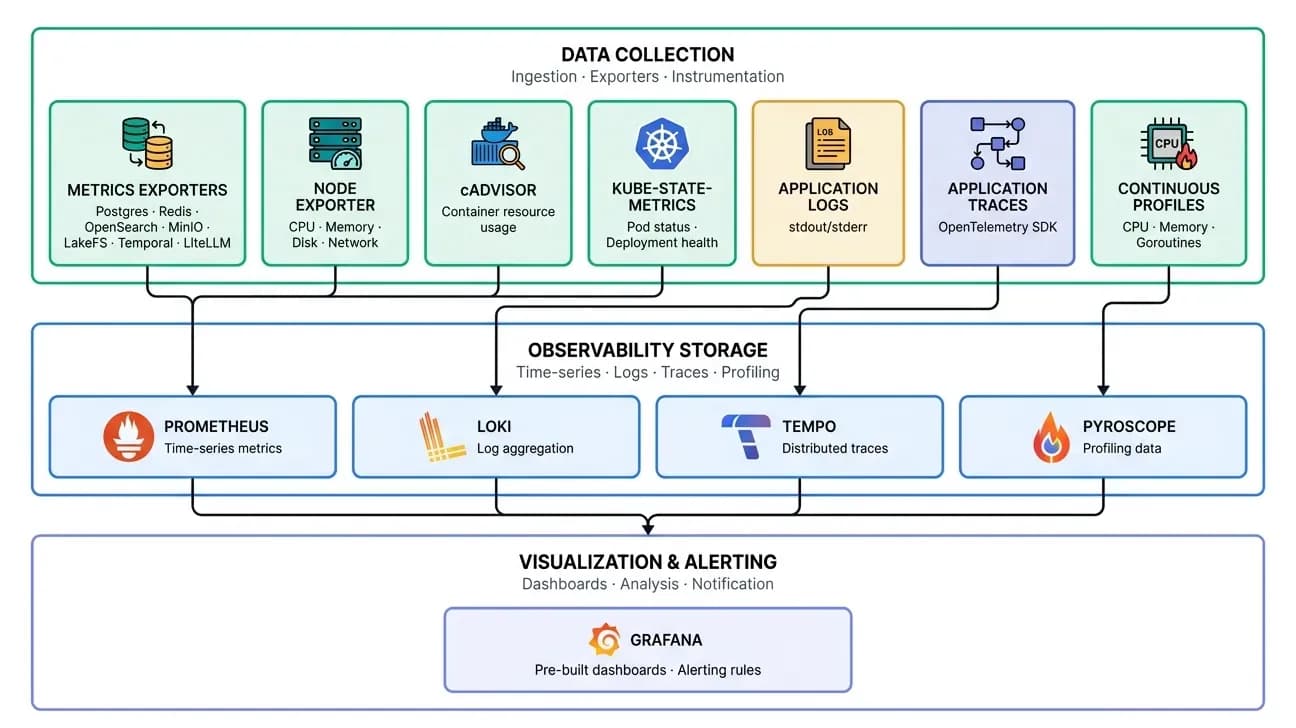
The platform ships with a fully configured observability stack. There is no setup required - dashboards, data sources, and collection pipelines are deployed and connected automatically.
Pre-built Grafana dashboards
The chart ships with nine pre-configured dashboards, ready to use on first boot:
| Dashboard | What it shows |
|---|---|
| System Metrics | Node CPU, memory, disk, network across the cluster |
| Kubernetes Metrics | Pod status, restarts, resource requests vs. actual usage |
| PostgreSQL Metrics | Connections, query throughput, replication lag, cache hit ratios |
| Redis Metrics | Commands/sec, memory usage, connected clients, key evictions |
| OpenSearch Metrics | Index size, query latency, cluster health, shard distribution |
| MinIO Metrics | Storage used, request rates, bucket-level breakdown |
| Temporal Metrics | Workflow throughput, activity latency, schedule lag, task-queue depth |
| LiteLLM Metrics | Token usage per model, cost per team, latency percentiles, error rates |
| LakeFS Metrics | Branch operations, commit frequency, storage utilization |
Four pillars of observability
| Pillar | Tool | Purpose |
|---|---|---|
| Metrics | Prometheus | Time-series data for every service, node, and container |
| Logs | Loki | Centralized log aggregation with label-based queries |
| Traces | Tempo | End-to-end distributed traces across service boundaries |
| Profiles | Pyroscope | Continuous CPU and memory profiling to identify bottlenecks |
Every agent execution, every LLM call, every workflow step produces telemetry that flows into these stores. When something goes wrong, you can trace from a user's chat message through the gateway, into the server, across Temporal activities, through LLM calls, and into the data layer - all from a single Grafana pane.
Development Environment
JupyterHub - Multi-user AI development
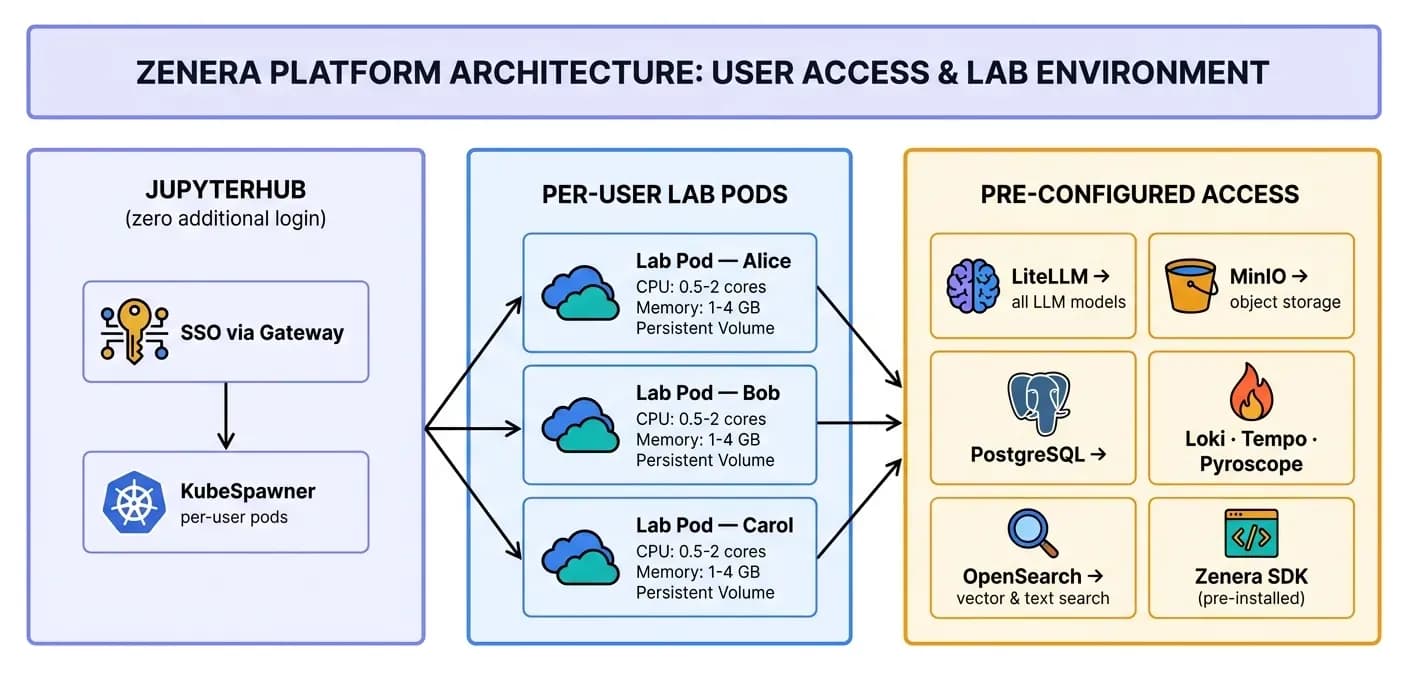
Every user who opens JupyterHub gets their own isolated Kubernetes pod with:
- Persistent storage - Notebooks survive pod restarts. Each user has their own PersistentVolumeClaim.
- Automatic notebook backup - MinIO sidecar continuously syncs notebooks to object storage.
- Pre-configured credentials - LiteLLM, PostgreSQL, OpenSearch, MinIO, Tempo, Loki - all connection strings and API keys are injected automatically. No manual setup.
- Zenera SDK pre-installed - Import and use the full platform SDK immediately.
- AI code assistance - Jupyter AI integration backed by LiteLLM, so notebook users have in-IDE model access.
- Resource isolation - CPU and memory guarantees and limits per user, configurable via Helm values.
Multi-Team Isolation and Collaboration
This is where the architecture becomes strategic. The platform is designed so that different teams can build completely isolated agentic systems - or share agents, artifacts, and skills across projects when collaboration is valuable.
Isolation Model
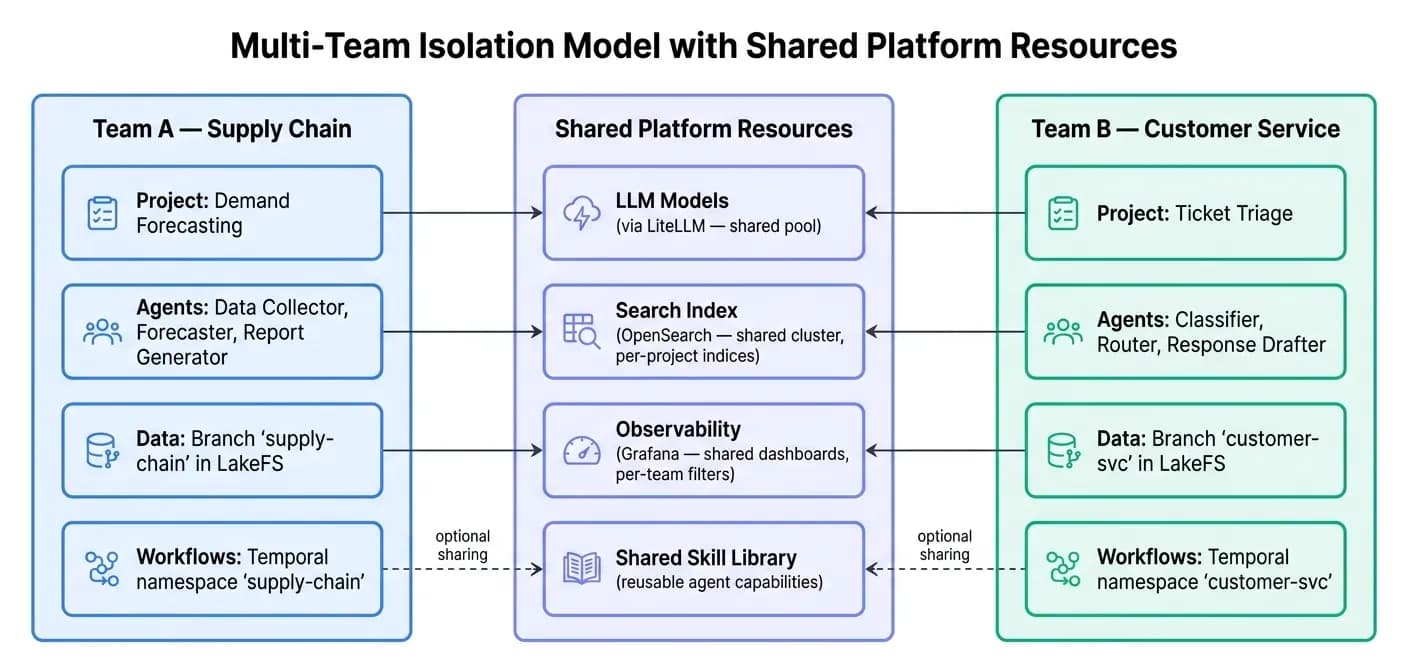
What Is Isolated by Default
| Resource | Isolation Mechanism |
|---|---|
| User identity | Zitadel organizations + role-based access |
| Agent projects | Per-project database scoping |
| Data artifacts | LakeFS branches + MinIO bucket policies |
| Workflow execution | Temporal namespaces + task queues |
| Notebook environments | Per-user Kubernetes pods with dedicated PVCs |
| LLM spend | LiteLLM per-team budgets and rate limits |
| Search indices | Per-project OpenSearch indices |
| Logs and traces | Label-based filtering in Loki and Tempo |
What Teams Can Choose to Share
| Resource | Sharing Mechanism |
|---|---|
| Agent skills | Publish skills to the shared skill library; other projects import them |
| Artifacts | LakeFS branch merging - merge validated datasets across teams |
| LLM models | Shared model pool via LiteLLM - all teams benefit from negotiated pricing |
| Observability | Cross-team dashboards in Grafana for platform-wide health |
| Knowledge bases | Shared OpenSearch indices for cross-team RAG pipelines |
Two teams can operate as if they have completely separate AI platforms - different projects, different data pipelines, different agents - while sharing the same infrastructure, the same LLM budget controls, and the same observability stack. When collaboration makes sense, it is opt-in and controlled.
External Integrations
Nango is deployed inside the chart to provide a unified integration layer for external SaaS systems.
Agents that need to read from Salesforce, write to Jira, pull data from HubSpot, or sync with Slack do so through Nango's managed OAuth flows and unified API.
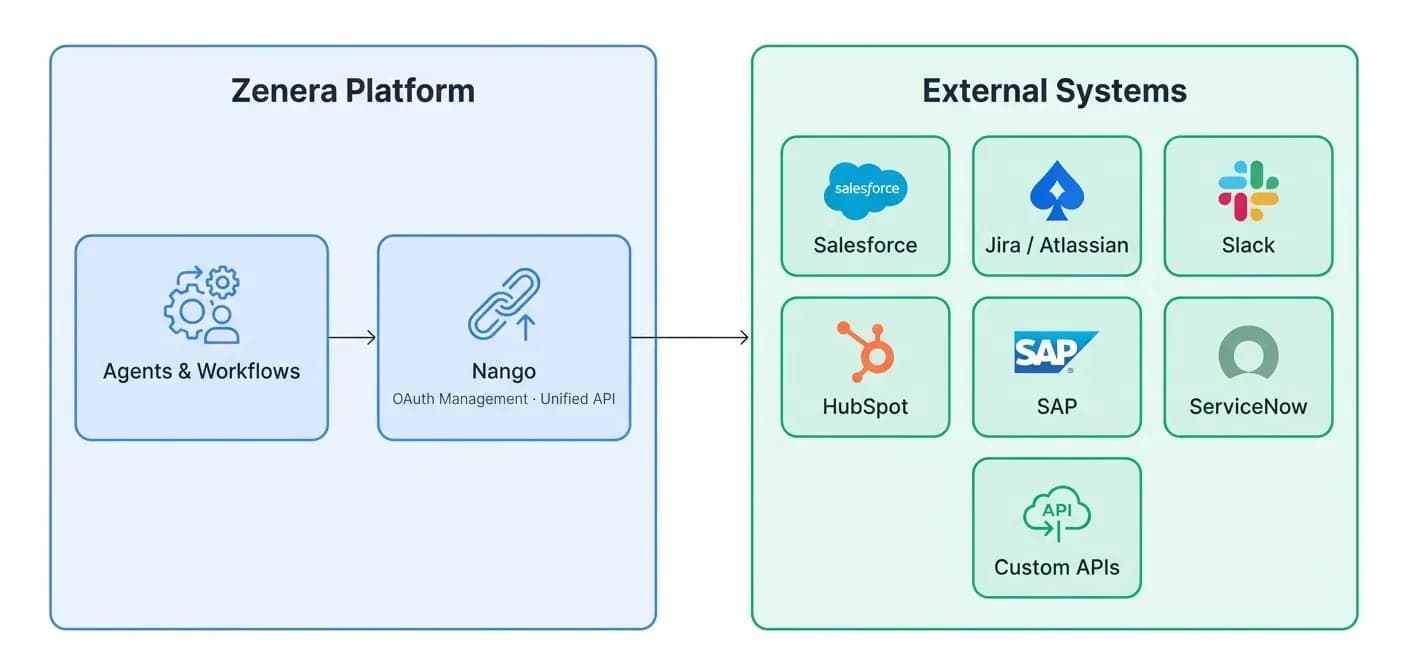
No manual OAuth token management. No per-integration credential rotation headaches. Nango handles the full lifecycle.
Network Architecture
Every service runs behind ClusterIP (internal only). The only externally reachable component is the Caddy gateway, which exposes dedicated ports for each service - all behind authentication.
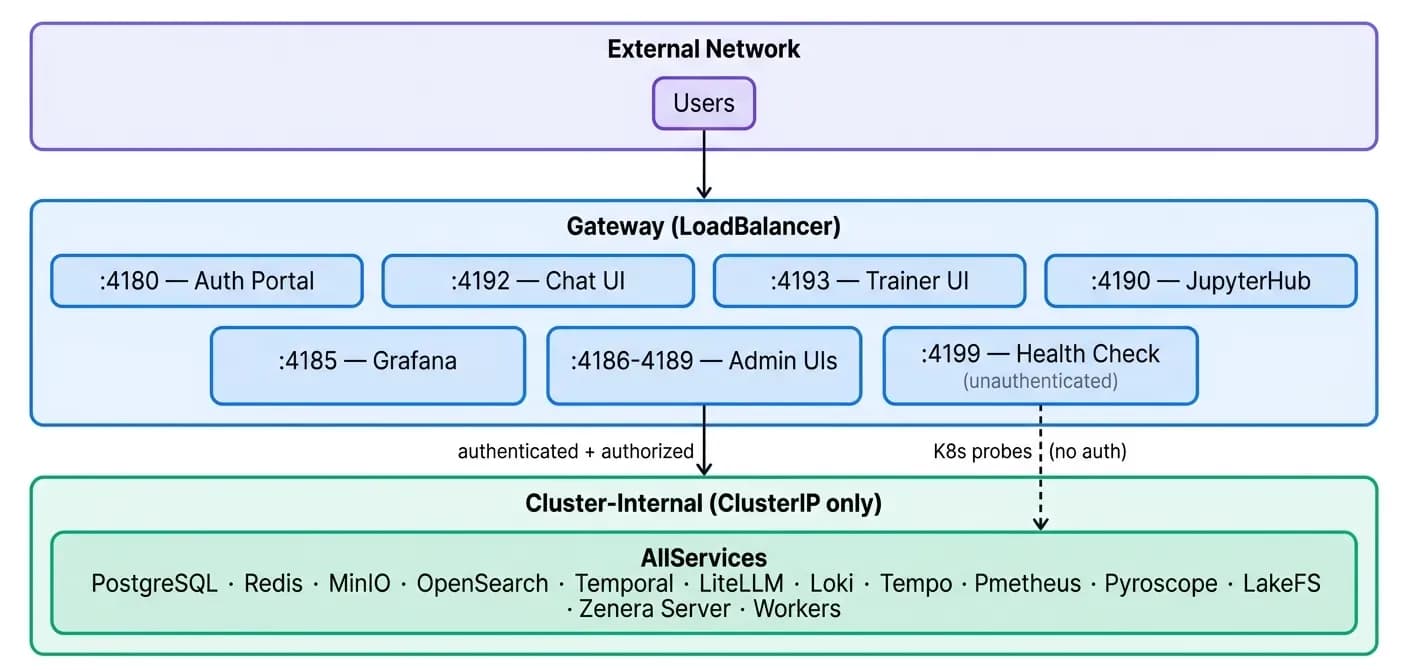
Internal services communicate directly via Kubernetes DNS. No service mesh required - the chart pre-wires all service discovery through environment variables and Helm template helpers.
Secrets Management
The chart supports two modes:
External Secrets (Default)
Run the provided create_secrets.sh script before helm install. Secrets are created as a Kubernetes Secret object outside of Helm's lifecycle, ensuring they are not stored in Helm release history.
Helm-Managed Secrets
Set secrets.create=true and provide values via --set or a values-secrets.yaml file. Convenient for development environments.
All secrets flow to services through Kubernetes secretKeyRef - database passwords, API keys, OIDC client credentials, JWT signing keys, MinIO credentials, LakeFS access keys. No secrets are ever stored in ConfigMaps or environment variable literals.
Deployment Topology
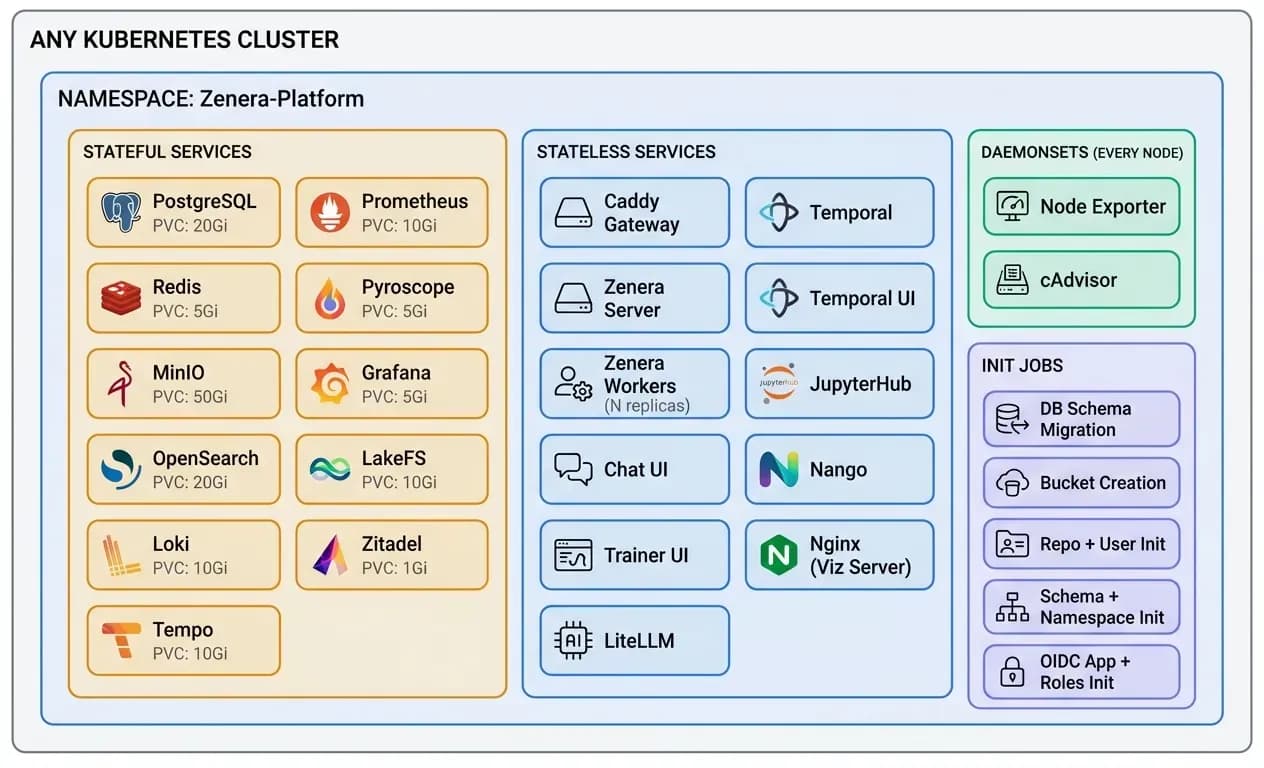
Resource Defaults
All PersistentVolumeClaims, CPU/memory requests, and replica counts are configurable via Helm values. The chart ships with sensible defaults for production:
| Service | Default PVC | Purpose |
|---|---|---|
| PostgreSQL | 20 Gi | Application + workflow + LLM tracking data |
| MinIO | 50 Gi | Agent artifacts, datasets, notebook backups |
| OpenSearch | 20 Gi | Search indices, vector embeddings |
| Prometheus | 10 Gi | Time-series metrics retention |
| Loki | 10 Gi | Log retention |
| Tempo | 10 Gi | Trace retention |
| LakeFS | 10 Gi | Data versioning metadata |
| Redis | 5 Gi | Cache persistence |
| Grafana | 5 Gi | Dashboard state, alerting rules |
| Pyroscope | 5 Gi | Profiling data |
| Zitadel | 1 Gi | Identity data |
Deployment in Three Commands
The chart handles everything else: database initialization, schema migrations, bucket creation, OIDC application provisioning, Grafana dashboard loading, Prometheus scrape configuration, and service health ordering through init containers.
# 1. Create secrets
./scripts/create_secrets.sh

# 2. Install the platform
helm install zenera-platform ./zenera-platform \
  --namespace zenera \
  --create-namespace

# 3. Access the platform
open http://zenera-local.com:4180
Every Component Is Optional
Every service in the chart has an enabled flag. Running in an environment that already has PostgreSQL? Set postgres.enabled: false and point the connection string to your existing instance. Already have Grafana? Disable it. Want to defer JupyterHub until phase two? Turn it off.
# Example: minimal deployment
postgres:
  enabled: true
redis:
  enabled: true
minio:
  enabled: true
opensearch:
  enabled: true
temporal:
  enabled: true
litellm:
  enabled: true
zitadel:
  enabled: true
gateway:
  enabled: true
zenera:
  server:
    enabled: true
  worker:
    enabled: true
  chat:
    enabled: true

# Disable optional services
jupyterhub:
  enabled: false
grafana:
  enabled: false
pyroscope:
  enabled: false
nango:
  enabled: false
This is not vendor lock-in - it is a platform that meets you where your infrastructure already is.
Why This Matters
Most enterprise AI initiatives stall at the infrastructure phase. Teams spend months piecing together identity providers, model gateways, workflow engines, storage layers, and observability stacks - only to discover they still lack the connective tissue that makes them work together.
Zenera eliminates that phase entirely.
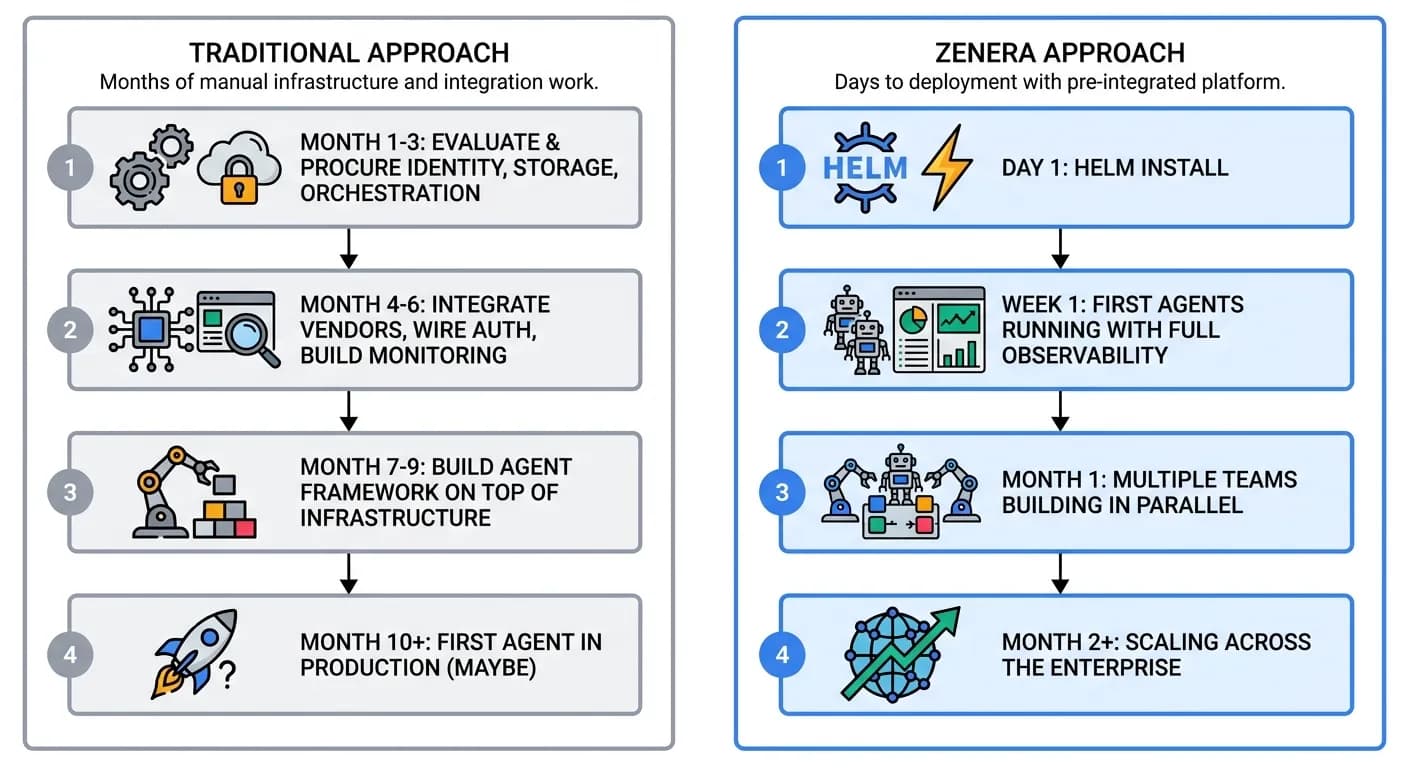
"One chart. Every service. Any Kubernetes cluster. Deploy the complete AI platform and start building agents - not infrastructure."
See the Platform in Action
Deploy the complete Zenera Platform on your Kubernetes cluster and start building production-grade agentic systems - not infrastructure.
Request a Demo